
This post contains affiliate links. If you buy through them, DumbSwitches may earn a commission at no extra cost to you. See our full disclosure.
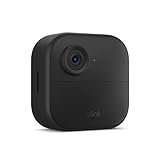
Blink cameras are dead simple to mount – the included hardware covers most situations right out of the box. But depending on where you’re installing and what you’re worried about (theft, weird angles, siding you don’t want to drill through), there are better options than the stock setup. This guide covers what comes in the box, how to use it, the right height and angle for motion detection, and the third-party mounts worth knowing about.
If you’re mounting a Blink doorbell instead of a standard camera, see our Blink video doorbell installation instructions.
What Comes in the Box
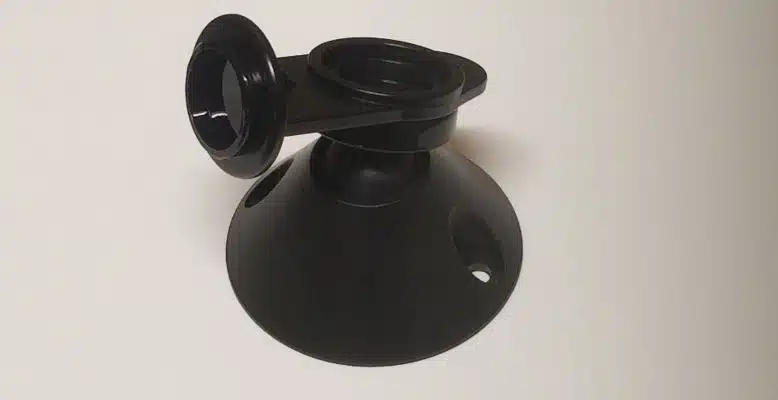
Every current Blink camera (Outdoor 4, Indoor 4, Mini 2) ships with a basic mount kit. For the Outdoor 4, that’s a mounting plate, a right-angle adapter/opening tool, and two screws. The Indoor 4 includes the same mounting plate and hardware. It’s enough to get the camera on any flat wood or drywall surface – nothing fancy, but it works.
The stock mount gives you a fixed angle. If you need to point the camera around a corner, adjust for a tricky surface, or just want more flexibility, you’ll want a third-party option (more on those below).
One thing to be clear on: the Blink Outdoor 4 is IP65-rated and fully weatherproof. The Indoor 4 and Mini are not – don’t put them outside.
Standard Mounting Setup
Using the hardware that came with your camera, here’s how to do it:
Pick your location
Hold the camera up before committing. Check your phone’s Blink app live view to confirm you’re covering the zone you want. Walk the space if motion detection coverage matters – movement crossing the frame side-to-side triggers PIR sensors better than movement coming straight at the camera.
Mark your drill points
Hold the mounting plate against the surface in the exact position you want, then mark the screw holes with a pencil or tape. Double-check the camera will point the right direction before drilling anything.
Drill pilot holes
Use a drill bit slightly smaller than your screws. For exterior wood, drywall anchors are not needed if you’re hitting a stud. For masonry or brick, use the appropriate masonry bit and wall anchors.
Screw the mounting plate in
Drive the screws through the mounting plate into your pilot holes. Snug is fine – you don’t need to overtighten.
Attach the camera
Slide the camera onto the mounting plate until it clicks into place. Use the right-angle opening tool to adjust the ball joint angle if needed, then tighten.
Best Mounting Height and Angle
For outdoor cameras, the sweet spot is 7-10 feet off the ground. That’s high enough that someone can’t easily grab or redirect the camera, but low enough that you’re capturing faces rather than the tops of heads. Gutter height (10-14 feet) works too and adds a bit more theft resistance – the Blink Outdoor 4’s PIR sensor has roughly a 20-foot effective range, so ground-level detection is still fine from there.
Aim the camera slightly downward. A flat or upward angle is almost always wrong for motion detection – you want the PIR sensor sweeping across the area where people move, not pointing at the sky or a wall. The Blink’s passive infrared sensor picks up horizontal movement across the frame much better than movement coming directly toward it, so position accordingly.
A few things to avoid at any height: pointing toward direct sunlight or a bright window (kills night vision, causes false triggers), aiming at swaying trees or bushes (constant false alerts), and mounting so close to a soffit that the housing blocks the field of view.
For indoor cameras, eye level – roughly 5-7 feet – is the standard. That gives you clear face-level footage. Corner placement covers more of a room than a flat wall mount; a corner mount bracket (see below) makes this easier. If you need to adjust sensitivity after mounting, do it from the Blink app rather than repositioning the whole camera.
Third-Party Mount Options
The stock mount works for most situations, but these are the cases where you’ll want something else.
Anti-Theft Mount (Recommended)
If camera theft or tampering is a real concern, the UYODM Anti-Theft Camera Mount Cage is the go-to. It wraps the camera in a metal cage secured to the wall, with hex screws that require a specific tool to remove. 360-degree swivel and 90-degree tilt let you dial in the angle before locking it down. Made from aluminum alloy, rust-resistant. Compatible with Blink Outdoor 4, Indoor, Mini, and a handful of other brands.
The cage design also deters casual theft – most would-be grabbers won’t bother with something that obviously requires tools.
Corner Mount
A corner mount lets you cover two directions from a single camera – useful for room corners indoors or building corners outdoors. The angled base attaches to the corner itself, and the camera connects on top pointing outward at roughly 45 degrees. Most include both screw-in and adhesive installation options. Look for options compatible with the Blink Outdoor 4 or 3rd Gen specifically, as the mounting thread size matters.
Ball Joint / Adjustable Mount
The stock Blink mount has limited angle adjustment. If you’re mounting somewhere awkward – under an eave, on a slanted surface, on a pole – a dedicated ball joint mount gives you full 360-degree rotation and multi-axis tilt. Several third-party mounts add a weatherproof housing around the camera body as well, which helps on the Outdoor 4 in locations with direct rain exposure.
No-Drill Options
If you’re renting, working with vinyl siding, or just don’t want to put holes in something:
- Adhesive mount – 3M-style adhesive pads work on smooth, non-porous surfaces (glass, painted concrete, smooth plastic). Not reliable on stucco, rough brick, or any surface with texture.
- Gutter mount – clamps onto your gutters, no drilling. Good for getting cameras up at roofline height with a clear downward view.
- Magnetic mount – attaches to any metal surface. Works well on metal doors, garage door frames, metal light fixtures.
- Suction cup mount – glass windows only. Gives you an indoor camera pointing outward, which also keeps the camera itself out of reach.
Removing a Camera From Its Mount
For the standard Blink mount, pull the camera firmly straight out from the plate – it should pop off without tools. For third-party caged or anti-theft mounts, you’ll need the hex key or tool that came with it.