
This post contains affiliate links. If you buy through them, DumbSwitches may earn a commission at no extra cost to you. See our full disclosure.
Smart kitchen appliances are worth it if you actually cook. The remote preheating, energy monitoring, and app-controlled timers aren’t gimmicks – they shave real minutes off real meals and catch real problems (an oven left on, a fridge left ajar) before they become real disasters. Whether the upgrade makes sense depends on which appliances you use most and how much you hate hovering over them.
Here’s what current smart kitchen tech actually delivers in 2026, broken down by appliance category with honest notes on what’s improved, what’s been quietly cancelled, and where the money is well-spent.
Quick breakdown: the 10 core benefits
- Remote preheat and oven control from your phone (no more sprinting home to an empty kitchen)
- Energy monitoring that actually shows you what’s costing money, not just estimates
- Predictive maintenance alerts before a small issue becomes a $400 service call
- Food recognition in smart fridges (Samsung’s AI Vision Inside now identifies 37 fresh items automatically)
- Automated dishwasher optimization – Bosch Home Connect picks the most efficient cycle based on load and soil level
- No-preheat countertop ovens that skip the 15-minute wait entirely
- Safety alerts: open fridge door, oven left on, water leak detection, gas anomaly notifications
- Voice control via Alexa or Google Home for hands-free adjustments when your hands are covered in dough
- App-scheduled coffee brewing so your morning is already sorted when you walk downstairs
- Matter/Thread compatibility on newer appliances – one app, multiple brands, no bridge required
1. Remote control and preheat
The most immediately useful thing a smart oven does is let you start it from your phone. You leave work, hit preheat in the app, and by the time you’ve walked through the door and changed out of your work clothes, the oven is at 400F. That’s not a minor convenience – it’s 15-20 minutes recovered on every weeknight dinner.
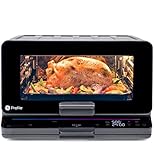
GE’s SmartHQ app works across their entire smart range and oven lineup. You can set temperature, adjust timers, and turn the oven off remotely. The GE Profile Smart Countertop Oven takes this further with Zero Preheat Technology – it skips the preheat phase entirely, targeting food directly from cold. Eleven cooking modes, 500F max, and WiFi connected.
2. AI-powered refrigerators
Samsung’s Bespoke AI Family Hub line is the current benchmark for smart fridges. The 2026 update adds Google Gemini-powered AI Vision that recognizes 37 fresh food items through interior cameras, tracks what’s running low, and adds items to your shopping list automatically. It’s been available since May 2026 as a software update to existing Bespoke AI owners in the US.
The Family Hub display (available in 9-inch and 32-inch screen configurations) also runs Bixby for conversational voice commands – you can ask it what’s in the fridge without opening the door, which is the kind of small thing that adds up to real fridge-life extension over years of use.
A note: Whirlpool’s Yummly integration – which the original version of this article recommended for barcode scanning and recipe lookup – shut down permanently in December 2024. Whirlpool laid off the entire Yummly team in early 2024 and pivoted to generative AI. If you were relying on Yummly for smart appliance recipes, it’s gone.
3. Energy monitoring and peak-time management
Smart appliances don’t just use energy – they report on it. Most current WiFi-connected dishwashers, ranges, and refrigerators surface real-time energy consumption through their apps. The practical value is running your dishwasher or dryer during off-peak hours when electricity is cheaper, which requires knowing what your appliances actually draw and when.
Modern smart kitchens running connected appliances are saving 20-30% on monthly electricity versus equivalent dumb setups, according to energy modeling from smart kitchen installers. That’s not a small number on a household with electric ranges, refrigerators, and dishwashers running daily.
For the smart home side of energy management – smart plugs that track consumption on individual circuits, scheduling automations – see our guide to smart plug uses and the Kasa Smart Plug app.
4. Predictive maintenance and cost reduction
This one is genuinely underrated. Smart appliances with onboard diagnostics flag anomalies before they escalate. A refrigerator that notices its compressor is cycling more frequently than usual can alert you weeks before a full breakdown. A dishwasher that detects a minor seal issue tells you while it’s still a $40 gasket, not a $400 flooded kitchen floor.
Bosch’s Home Connect dishwashers send diagnostics directly to service technicians if you opt in. Samsung’s SmartThings-integrated appliances generate maintenance reports accessible in the app. These aren’t hypothetical features – they’re standard on current mid-range and up smart appliances.
5. Smart dishwashers: automated efficiency
Bosch’s Home Connect lineup is the best argument for a smart dishwasher. Their 500 and 800 series models connect to WiFi, let you start and monitor cycles remotely, and – most usefully – automatically select the most efficient program based on how loaded the machine is and how dirty the load looks. A full heavily-soiled cycle uses 40% less energy than manual setting when the machine picks its own mode.
The app also tracks detergent levels and can trigger an automatic Amazon reorder when you’re running low. That’s either genuinely useful or slightly alarming depending on your relationship with automation. It’s there either way.
6. How to connect a smart appliance to your home network
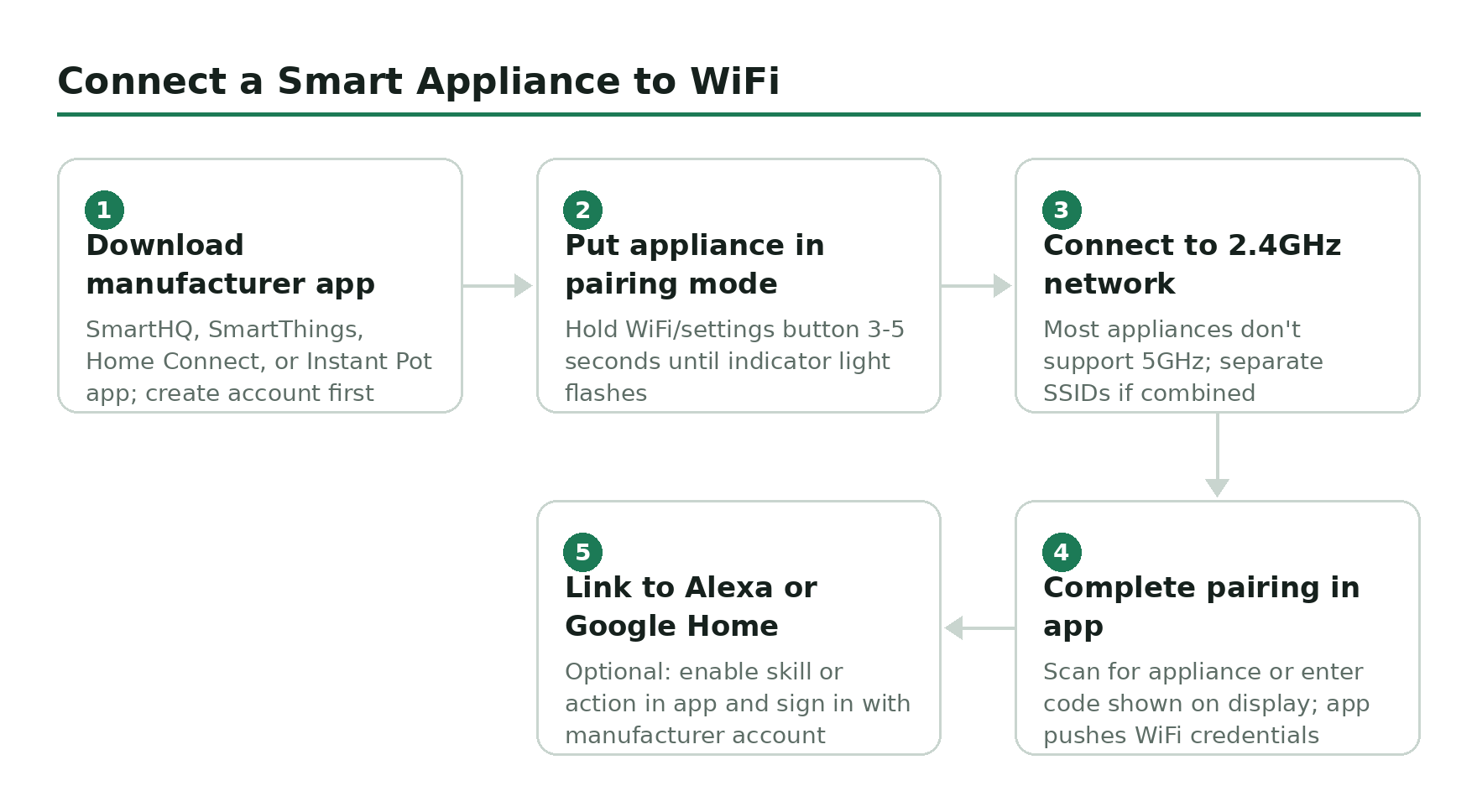
Download the manufacturer app before setup
GE appliances use SmartHQ, Samsung uses SmartThings, Bosch uses Home Connect, Instant Pot uses the Instant Pot app. Get the right app installed and create your account before touching the appliance pairing mode.
Put the appliance in pairing mode
Most smart appliances enter pairing mode via a dedicated WiFi or settings button on the control panel. Hold it for 3-5 seconds until an indicator light flashes. Check the manual for your specific model – pairing modes vary significantly between brands.
Connect to your 2.4GHz network (not 5GHz)
Most smart appliances only support 2.4GHz WiFi, not 5GHz. If your router broadcasts both on the same SSID, you may need to temporarily separate them or connect from a device already on 2.4GHz. This is the single most common setup failure point.
Complete pairing in the app
Follow the in-app steps to scan for the appliance or enter a pairing code shown on the display. The app will push the WiFi credentials to the appliance. Once connected, you will see the appliance appear in your device list.
Link to Alexa or Google Home (optional)
In the manufacturer app, find the skill or integration section. Enable the relevant Alexa skill or Google Home action and sign in with your manufacturer account. Your appliance will appear in the Alexa or Google Home app within a few minutes.
7. Enhanced kitchen safety
The safety case for smart kitchen appliances is stronger than most people expect. These aren’t theoretical edge cases – they’re the kinds of things that happen to everyone who cooks regularly.
- Open fridge door alerts (most Family Hub and smart fridge apps)
- Oven left on notifications (GE SmartHQ, Samsung SmartThings)
- Water leak sensors in smart dishwashers (Bosch Home Connect flags anomalous water flow)
- Child lock via app – useful when you can’t reach the physical control from across the house
- Overheating protection with automatic shutoff on smart cookers
If you’ve ever driven 20 minutes to work and spent the whole day half-convinced you left the oven on, remote monitoring alone is worth the upgrade cost.
8. Smart coffee makers
The Cafe Specialty Smart Drip Coffee Maker is the benchmark here. WiFi connected, SCA-certified (that’s the Specialty Coffee Association’s highest standard), and controllable via SmartHQ, Alexa, or Google Home. Schedule it the night before, adjust brew strength remotely, and it brews from 185 to 205 degrees depending on what you’re making. Four brew modes: Gold, Light, Medium, Bold.
The Voice-to-Brew feature via Alexa is the kind of thing that sounds like a gimmick until you’re half-asleep and don’t want to touch anything. Then it’s the best feature on any appliance you own.
9. Smart multi-cookers and air fryers
The Instant Pot Pro Plus WiFi is still the pick for a smart multi-cooker. Ten functions – pressure cook, slow cook, rice, steam, saute, sous vide, yogurt, and more – with app connectivity through the Instant Pot app and access to over 1,900 recipes. Start a slow cook from the office. Check the pressure stage on your phone. Adjust time without getting off the sofa. It works.
For smart air fryers, the COSORI Pro Gen (ASIN: B0BPY841P6) connects via the VeSync app with Alexa and Google Home support, 11-in-1 functions, and a library of 100+ guided recipes. The Midea Dual Basket WiFi Air Fryer (ASIN: B0CMXN9ZF7) is worth a look if you’re cooking for more than two – 11-quart capacity with Alexa support and a smart sync-finish feature that coordinates both baskets to finish simultaneously.
10. Connectivity standards: what to check before you buy
In 2026, the smart home standard that matters is Matter. Appliances with Matter support work across Alexa, Google Home, Apple HomeKit, and SmartThings without needing brand-specific bridges. Not every kitchen appliance supports it yet – major white goods (fridges, dishwashers, ranges) are slower to adopt than lighting and plugs – but it’s worth checking for on any new purchase.
If you’re already running a smart home ecosystem, check smart home protocol compatibility before buying – a Samsung fridge on SmartThings plays differently with an Apple HomeKit setup than a Matter-compatible appliance would. And if you want to know the full landscape of WiFi vs. Z-Wave vs. Zigbee for connected devices, the protocol comparison guide has the breakdown.
Related guides
- 11 Best Uses for Smart Plugs – how to retrofit dumb appliances with remote control
- Kasa Smart Plug App Guide – schedule and monitor appliance power consumption
- Smart Home Protocols Explained – WiFi, Z-Wave, Zigbee, Matter, Thread
- Z-Wave vs. Zigbee vs. Wi-Fi – which is best for your setup