

This post contains affiliate links. If you buy through them, DumbSwitches may earn a commission at no extra cost to you. See our full disclosure.
Ring discontinued the Video Doorbell 2 in 2020, but if you still have one on your wall it is not an orphan. Ring still sells replacement parts directly, the Quick Release battery is on Amazon, and several accessories continue to ship. Here is what is still available in 2026 and what is worth buying.
Quick Reference: What Is Still Available
- Replacement battery pack – yes, still on Amazon
- Spare parts kit (mounting hardware, screws, charging cable) – yes, from Ring direct
- Faceplates – limited colors remain, check current stock
- Security screw (T6 Torx) – yes, cheap on Amazon
- Wedge and corner mount kits – yes, Ring still sells these
- Solar charger – the official Ring solar charger for Doorbell 2 has been discontinued; third-party micro-USB options exist
- Ring Chime – still works with Doorbell 2 over Wi-Fi
Replacement Battery Pack
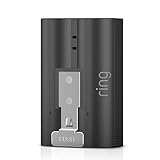
The most important thing to know: the Ring Video Doorbell 2 has a removable Quick Release battery. You do not have to unmount the whole doorbell to charge it – just pop out the battery, charge it via micro-USB, and slide it back in. This is the single biggest practical advantage the Doorbell 2 has over the later Ring Video Doorbell (2nd Generation), which has a fixed internal battery that forces you to unmount the unit every time.
Ring’s Quick Release Battery Pack (B076JKHDQT) is still available on Amazon. Buying a second one means zero downtime – one charges while the other keeps the doorbell running. At around $25, it is one of the best practical accessories you can add. The battery also works across multiple Ring devices (Stick Up Cam, Spotlight Cam, Peephole Cam) so it is a useful spare even if you upgrade later.
Ring’s model number for this battery is 8AB1S7-0EN0. Third-party replacements exist (6040mAh, 3.65V) but Ring’s official battery is the safer call for a device you are still relying on day-to-day.
Spare Parts Kit
Ring sells a Spare Parts Kit for the Video Doorbell 2 that covers the hardware people most commonly lose or strip over time. The kit includes a mounting bracket, mounting screws, anchors, security screws, a micro-USB charging cable, and a screwdriver bit. If you are reinstalling after painting the house or just cannot find where the original hardware went, this is the one box that replaces all of it.
Faceplates
The Doorbell 2 has interchangeable faceplates that snap on and lock with the security screw. Ring sold these in a range of colors – Bright Turquoise, Mustard, Ivy Leaf, and others. As of 2026 the selection is thinner than it was at peak, but several colors remain available through Amazon. Search for “Ring Video Doorbell 2 faceplate” on Amazon to see current stock – availability shifts as Ring clears remaining inventory.
To swap a faceplate you need to remove the security screw first – which requires a T6 Torx bit. More on that below. The full process is covered in our guide on how to remove the Ring Doorbell 2 faceplate.
Security Screw and T6 Torx Screwdriver
The Doorbell 2 uses a T6 Torx security screw to hold the faceplate in place – the idea being that casual thieves cannot unscrew it with a standard screwdriver. The tool is included in the original box, but that small screwdriver has a way of disappearing. Replacement T6 Torx bits are cheap on Amazon (search “Ring doorbell T6 Torx replacement screws”) and the spare parts kit above includes one as well.
Worth noting: the Doorbell 2 uses T6 for the faceplate screw. Some Ring accessories and mounting hardware use T15. A double-ended T6/T15 bit handles both.
Wedge Kit and Corner Kit
If your doorbell is not facing straight at whoever is at the door – because the wall is at an angle, or the door is set back from the corner – Ring makes two angled mounts that fix this.
- Wedge Kit: tilts the doorbell left or right by a fixed angle. Good for a wall that is not quite parallel to the door.
- Corner Kit: a 90-degree mount for when the doorbell is on a corner wall. Comes with three different mounts to get the angle right.
Ring has separate mount kits for the original Doorbell 2 versus the later Ring Video Doorbell (2nd Generation) – they look similar but are not interchangeable. Make sure you are ordering the version labeled for the original Video Doorbell 2 (model number 8VR1S7). Ring still lists these at ring.com.
Solar Charger
This one requires an honest answer: the original Ring solar charger designed for the Doorbell 2 has been discontinued. Ring’s current solar chargers use a fork-style connector that is not compatible with the Doorbell 2’s micro-USB port.
Third-party micro-USB solar panels are still available on Amazon – search “Ring Video Doorbell 2 solar charger micro USB” and look for one that specifically lists micro-USB (not USB-C or fork connector). The Wasserstein solar charger (B07DWNNJG7) was designed for the Doorbell 2 and may still be in stock through third-party sellers. Performance depends entirely on how much direct sunlight the mounting location gets – less than three to four hours per day and it will not keep up with normal motion detection usage.
The dumbswitches.com Ring Doorbell 2 solar charger guide covers installation and what to realistically expect from it.
Ring Chime
The Ring Doorbell 2 connects to any Ring Chime or Ring Chime Pro over Wi-Fi. If you want the doorbell sound in a room that is far from the front door, a Chime plugs into a standard outlet and handles it. This is still a genuinely useful add-on – the phone notification gets missed when you are in the shower or the phone is on silent. A Chime in the kitchen solves that without any wiring.
Full details in the Ring Doorbell 2 with Chime guide.
How to Change the Ring Doorbell 2 Battery
Press the release tab on the battery
The Quick Release battery has a small orange tab at the bottom. Press it and pull the battery straight out from the bottom of the doorbell.
Charge via micro-USB
Plug the battery into any micro-USB cable. A red light means charging, green means full. Charging from empty takes roughly five to six hours.
Slide the charged battery back in
Insert the battery from the bottom, label side facing out, until it clicks into place. The doorbell will reconnect to Wi-Fi automatically within about 30 seconds.
What Is Actually Worth Buying
If you own the Doorbell 2 and want to get more out of it without spending much, the priority order is clear.
- Second battery pack – worth every dollar. Eliminates the dead-doorbell gap every time the battery runs down.
- Wedge or corner kit – worth it if your coverage angle is off. Cheap fix for a real problem.
- Ring Chime – worth it if you miss rings while the phone is away from you. A single Chime covers most homes.
- Faceplate swap – purely cosmetic. Worth it if the existing color bothers you, otherwise skip it.
- Solar charger – low priority given compatibility limitations. Only consider if the mounting location gets direct sunlight most of the day and you want to avoid charging the battery manually every few weeks.