
This post contains affiliate links. If you buy through them, DumbSwitches may earn a commission at no extra cost to you. See our full disclosure.
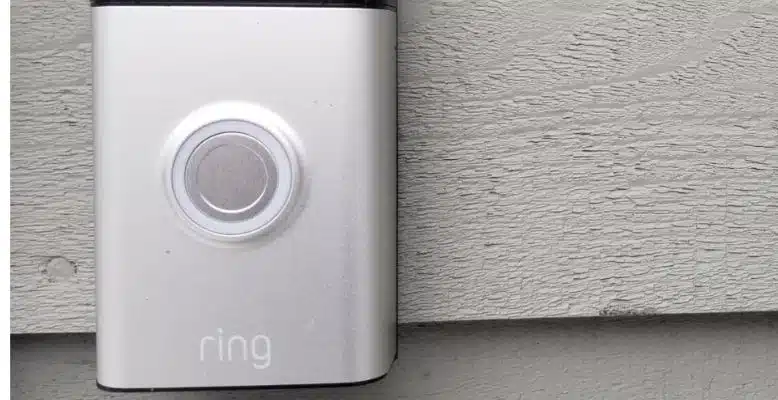
Pop the T15 Torx screw out of the bottom, tilt the faceplate forward, lift it off. That’s it. The Ring Doorbell 2 faceplate removal takes about 30 seconds once you know what you’re doing – the only reason people get stuck is not knowing which screw to look for.
Quick note before we start: Ring discontinued the Doorbell 2 around 2020. Millions are still in service and the faceplate procedure below applies to every unit ever made. If you’re shopping for a replacement down the road, the current equivalent is the Ring Battery Doorbell Plus.
What You Need
One tool: the star-shaped screwdriver that came in the Ring box. That’s a T15 Torx bit – if you’ve lost it, any T15 Torx driver or a double-ended T6/T15 kit will work. You don’t need to cut power to the doorbell to swap a faceplate.
How To Remove The Faceplate From A Ring Doorbell 2
Locate the security screw at the bottom of the doorbell
There is one star-head security screw at the very bottom of the unit. It takes a T15 Torx bit – the same star-shaped driver that came in the Ring box.
Remove the security screw
Turn counterclockwise to loosen. Set it somewhere you won’t lose it – Ring uses a proprietary head, so replacements are mildly annoying to source.
Tilt the bottom of the faceplate forward
With the screw out, grip the bottom edge of the faceplate and pull it gently toward you. It pivots forward and detaches from the top slot.
Lift the faceplate up and off
Once the bottom is free, slide the faceplate upward to clear the slot under the camera lens. The whole panel comes off cleanly.
Reattach by reversing the steps
Slide the new (or same) faceplate into the slot at the top first, then swing the bottom down until it clicks. Reinsert the T15 security screw and tighten. Done.
Why You Might Be Removing It
The most common reason is battery access – the Ring Doorbell 2 runs on a removable rechargeable battery pack, and the faceplate has to come off before you can pull the battery. Ring’s stated battery life is 6-12 months depending on usage, so most owners do this a couple of times a year. If yours is draining a lot faster than that, the battery troubleshooting guide covers the usual causes.
The other reason is aesthetics. Ring sold the Doorbell 2 with interchangeable faceplates in a handful of colors – venetian bronze and satin nickel came in the box, and Ring sold additional colors separately (burgundy, mustard, turquoise, and a few others). Those color-specific plates are still listed on Amazon if you want to swap looks.
What to Check While It’s Open
Since you’re already in there, take thirty seconds to look at two things most owners never check.
First, the charging contacts – the metal pins where the battery meets the doorbell body. Green or white crust on them is corrosion, usually from moisture that got past the battery door seal at some point. A pencil eraser or a dry cloth clears light corrosion fine. If the contacts are pitted or the crust keeps coming back, that’s a sign water is getting in somewhere and the unit’s days may be numbered.
Second, the rubber gasket that runs around the edge of the faceplate opening. It’s what keeps rain out of the electronics. If it’s cracked, flattened, or missing a section, the weather seal is compromised even if the faceplate clicks back into place fine. Ring doesn’t sell a replacement gasket separately – if it’s shot, that’s usually the point where replacing the whole unit makes more sense than nursing this one along.
Replacement Faceplates
If you want a different color, make sure the faceplate is specifically listed for the Ring Video Doorbell 2 – not the Doorbell 3, not the Doorbell Pro, not the Doorbell 4. The mounting clips are model-specific and they don’t cross-fit cleanly.
Ring still sells faceplates for the Doorbell 2 directly through its own store, and the original colors – venetian bronze, satin nickel, plus the separately sold burgundy, mustard, and turquoise – turn up on Amazon too. Third-party faceplates exist on Amazon and Etsy as well, but quality varies and none of them carry Ring’s weather-sealing tolerances. Treat a third-party plate as a cosmetic swap, not a like-for-like replacement.
A quick search for Ring Doorbell 2 faceplate on Amazon pulls up the official Ring color options as well as third-party alternatives.
None of this is worth doing if the doorbell itself has stopped working. A cracked faceplate is a five-minute fix – a dead sensor or a battery that won’t hold charge anymore isn’t. If you’re at that point, the current Ring doorbell lineup breaks down what replaced the Doorbell 2 and which model actually makes sense.