

This post contains affiliate links. If you buy through them, DumbSwitches may earn a commission at no extra cost to you. See our full disclosure.
IR Intensity on a Blink camera has three settings – Low, Medium, and High – and it controls how brightly the camera’s 850nm infrared LED fires when night vision kicks in. The default Auto behavior is usually fine, but if your night clips are washed out, the subject is too close for High. If they’re a dark blob, you need more. Here’s how to set it properly for each Blink model, and how to fix the most common night-vision failure modes.
The short version
- IR Intensity = how bright the camera’s infrared illuminator fires. Three options: Low, Medium, High.
- Night Vision Control = a separate setting that decides when IR kicks in. Three options: Auto, On, Off. Auto is the default and the right answer for almost everyone.
- Low – for areas with some ambient light (porch with a streetlight, hallway near a nightlight).
- Medium – the sane default for most setups.
- High – for genuinely pitch-black yards, garages, or driveways with zero ambient light.
- If your subject is close to the camera and you’re on High, you’ll get a glowing white ghost. Drop to Medium or Low.
- If you’re pointing through a window, turn IR Off entirely – it bounces off glass and ruins the shot.
What IR Intensity actually does
Every current Blink camera ships with an 850nm infrared LED (or an array of them, depending on model). When ambient light drops below a threshold, the camera fires the IR LED, the sensor flips to a monochrome mode, and you get the classic black-and-white night vision look. IR Intensity is just the brightness dial for that LED.
Higher intensity throws more infrared further out, which lets the sensor see further into the dark. The catch is that anything close to the camera gets blasted with so much IR that it reflects back hard and blows out the exposure. That’s why a raccoon at twelve feet looks fine on High, but the same raccoon climbing your porch railing two feet from the lens looks like a glowing white blob.
Per Blink’s official low-light support docs: Low is for moderately dark areas, Medium is the recommended general-purpose setting, and High is for places where almost no ambient light exists.
How to set IR Intensity in the Blink app
Open the Blink app and tap the camera you want to configure.
Tap the settings (gear) icon to open Device Settings.
Scroll to the Night Vision section.
Set Control to Auto (recommended). On forces IR all the time, Off disables it entirely.
Set IR Intensity to Low, Medium, or High based on how dark the scene gets.
Tap Save, then open Live View at night to verify the result. Adjust if the subject is washed out or too dark.
IR Intensity sits in the same Night Vision menu as Control, but they’re independent. Control decides whether IR runs; Intensity decides how bright it fires when it does. For more context on the rest of the camera options around it, see the best Blink camera settings guide.
Picking an intensity by placement
- Front porch with a streetlight or porch light nearby – Low. Anything more and the camera fights the ambient light, which produces a flickery, over-bright image when something walks past.
- Side yard, suburban back garden, garage interior with a small window – Medium. This covers most installations.
- Rural driveway, detached shed, pitch-black back garden with no neighbors – High. The IR has nothing to bounce off, so you need maximum throw.
- Camera mounted within six feet of where motion happens – drop one notch. Close subjects always wash out faster than you’d expect.
Per-model differences worth knowing
Blink Outdoor 4 and Outdoor (3rd Gen)
The battery-powered Outdoors use a single 850nm IR LED and ship with all three intensity options. The Outdoor 4 has slightly improved IR reach over the 3rd Gen but the settings menu is identical. These are the cameras the original “three IR levels” guidance was written for, and Medium is the right default.
Blink Outdoor 2K+
The Outdoor 2K+ is the model that complicates the story. It has color night vision, which works by pulling more detail out of ambient light before falling back to infrared. In practice that means:
- Control = Auto – camera switches between color (when there’s ambient light) and IR black-and-white (when there isn’t).
- Control = On – forces IR black-and-white only.
- Control = Off – forces color mode only. In total darkness this just gives you a black frame, so don’t use it unless you have spotlights.
IR Intensity still applies, but only matters when the camera has fallen back to infrared. If your front yard has decent streetlight bleed, Auto with Low or Medium will keep you in color most of the night, which is materially more useful than monochrome IR for identifying a person or vehicle.
Blink Mini, Mini 2, and Mini 2K+
The Mini line is indoor-only and USB-powered. The original Mini has IR night vision but no color mode. The Mini 2 and Mini 2K+ both added a built-in white LED spotlight plus color night vision. On these, you have an additional layer: if there’s some ambient light, the camera tries color first. The IR LED only fires when it has to.
For a Mini that lives in a hallway with any kind of nightlight or window: leave Control on Auto and IR Intensity on Low. You’ll get color most of the time and clean IR when the light dies.
Blink Doorbells (Video, Battery 2K+, Wired 2K+)
The doorbells use the same IR setup as the Outdoor cameras and respond to the same intensity settings. The only quirk: a person standing right at the door is, by definition, close to the camera, so doorbells are the model most prone to the “white ghost face” problem on High. Medium is almost always correct for a doorbell.
Fixing washed-out night clips
If your night clips look like a flashbang went off, the IR is too bright for the scene. Here’s the order to fix it.
Open the Blink app and tap the affected camera.
Tap the settings (gear) icon and scroll to Night Vision.
Drop IR Intensity one step (High to Medium, or Medium to Low) and save.
Open Live View at night and trigger motion at the spot where things get washed out. If still too bright, drop another step.
If even Low is too hot for a close subject, move the camera further back or angle it so the close object isn’t dead-center in the IR cone.
If you’re shooting through glass: set Control to Off and rely on outdoor ambient light or an external IR illuminator. IR through windows always reflects.
The window problem nobody warns you about
If you mount any Blink indoors and aim it through a window, IR night vision will produce a uniformly white blur as soon as the sun goes down. The camera’s own infrared LED reflects off the inside of the glass straight back into the lens. There is no intensity setting that fixes this – the only options are:
- Turn Night Vision Control to Off entirely. The camera will go dark, but if there’s a streetlight or porch light outside, you’ll get a usable color image.
- Add an external IR illuminator mounted outside, then leave the camera’s own IR off. This gives you clean night vision through glass.
- Press the camera lens flush against the glass and shroud it from indoor light. Reduces but doesn’t eliminate reflection.
- Just put the camera outside, which is what it was designed for. The Outdoor 4 is weatherproof for a reason.
IR Intensity vs IR Sensitivity
These get confused constantly because the names sound similar. They aren’t the same thing.
- IR Intensity – how bright the camera’s infrared LED fires. Output side.
- IR Sensitivity (an older Blink term, now mostly retired in the app) – how much light the sensor is collecting, which affected the apparent brightness of the feed. Input side.
If you’re trying to fine-tune what triggers a recording rather than how the night image looks, you want motion sensitivity settings, not IR Intensity.
Night vision still not working
If you’ve set Control to Auto and IR Intensity to Medium and the camera is still recording black frames at night, work through this list:
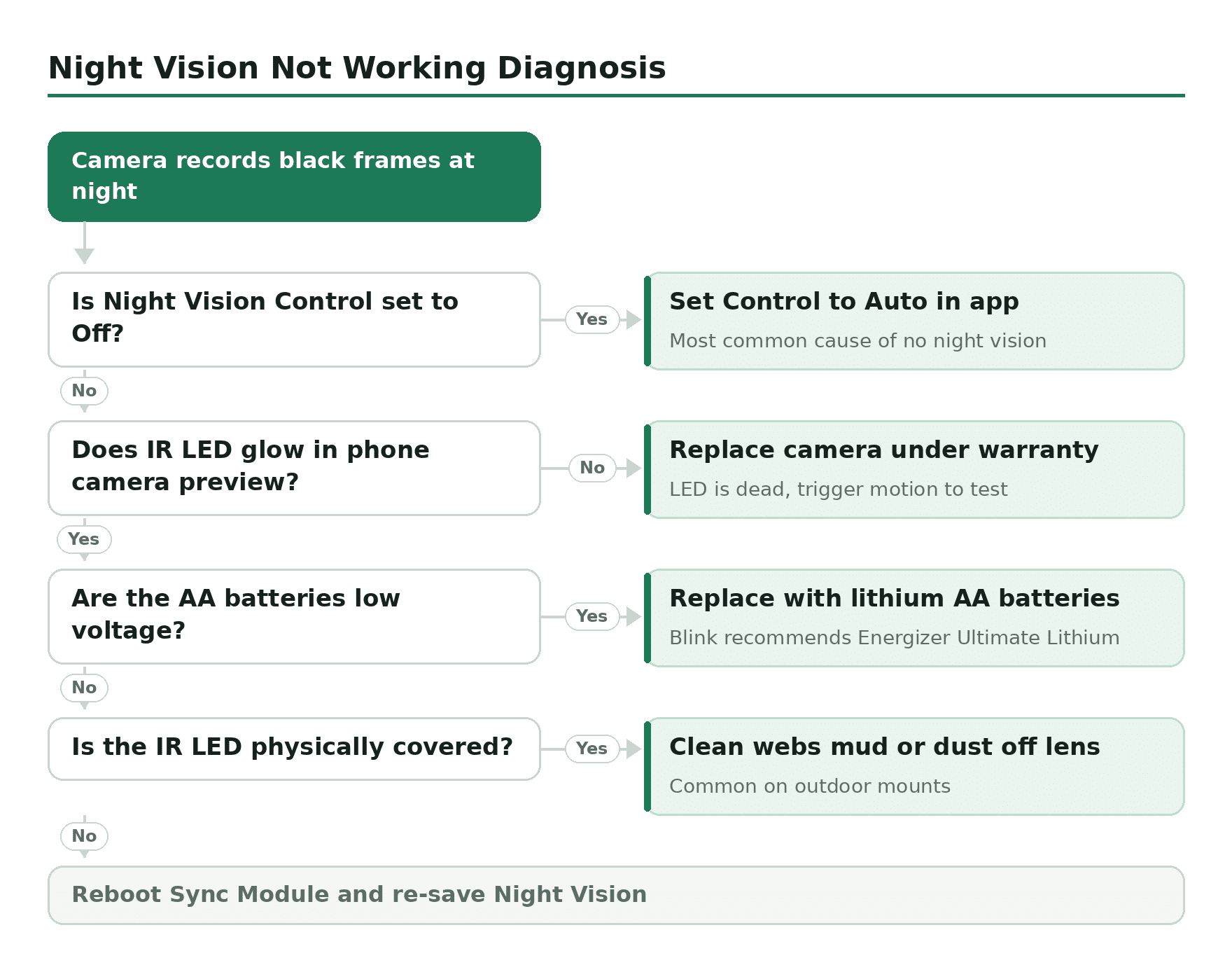
- Check that the Night Vision Control isn’t accidentally set to Off in the app. It’s the most common cause of “my Blink doesn’t see in the dark.”
- Look at the camera face under a phone camera (phone cameras can usually see IR). Trigger motion. If the IR LED isn’t glowing purple-white in the phone preview, the LED is dead – warranty replacement.
- Check the AA batteries on the Outdoor and Doorbell models. Low voltage can disable IR before it kills the rest of the camera. Replace with lithium AAs (Blink officially recommends Energizer Ultimate Lithium).
- Make sure nothing is physically covering the IR LED. Spider webs, mud spatter, and dust cause this constantly on outdoor mounts.
- If the camera’s Sync Module connection is flaky, settings changes sometimes don’t take. Reboot the Sync Module (unplug 10 seconds, plug back in) and re-save Night Vision.
Related guides
- Best Blink camera settings – the broader settings hub this post sits under.
- Blink camera sensitivity settings – the motion-detection counterpart to this guide.
- How Blink cameras work – the system overview if you’re new.
- The Blink Sync Module explained – the hub that makes most of this possible.