

This post contains affiliate links. If you buy through them, DumbSwitches may earn a commission at no extra cost to you. See our full disclosure.
Yes, Geeni cameras can be hacked. Every Wi-Fi camera can. The honest version of the question is whether Geeni is harder or easier to break into than the alternatives, and what you can actually do about it. The short answer: Geeni is no worse than most cheap cloud cams in 2026, but the security model has real limits you should understand before you point one at your living room.

The honest summary
- Geeni runs on Tuya. Merkury Innovations doesn’t build the firmware – they rebrand Tuya devices. Tuya’s cloud handles authentication, video relay, and updates for thousands of brands worldwide.
- The big public flaws were 2020-2021. Researchers found backdoor accounts, hardcoded telnet passwords, and a default admin login of 056565099 on multiple Geeni and Merkury cameras and doorbells. Merkury patched silently, never published CVEs, and called it a day.
- The Geeni app has supported 2FA since version 2.0.0 (late 2020). Almost nobody turns it on. You should.
- There is no real local-only mode. If Tuya’s cloud goes down, or someone gets into your Geeni account, your camera and its feed go with it. That’s the architecture – you can’t harden your way out of it.
- Most “my Geeni camera got hacked” stories are actually credential stuffing. Someone reused a leaked password, not a zero-day exploit. The fix is boring: unique password, 2FA on, done.
What “hacked” usually means with a Geeni camera
People hear “smart camera hacked” and picture a hooded figure typing furiously into a green terminal. Reality is duller. There are three things that actually happen, in descending order of frequency.
1. Account takeover via reused passwords. You signed up for some forum in 2017, that forum got breached, your email and password ended up in a credentials dump. A bot tries that combo against the Geeni cloud. If you used the same password, the bot is now you. It can see your camera. This is by far the most common scenario and it has nothing to do with Geeni’s code quality.
2. Local network compromise. Someone is already on your Wi-Fi (your guest password is “guest123”) and can see traffic to and from the camera. Cloud-relayed video is TLS-encrypted, so they can’t watch the feed, but they can fingerprint the device and look for known firmware bugs.
3. An unpatched firmware exploit. The rare one. The 2020 research from O’Connor and Campos found backdoor accounts and default credentials baked into a handful of Geeni and Merkury models. Those were patched (we think – Merkury never published a fix log, which is its own problem), but the same class of bugs keeps showing up across Tuya-based devices. CVE-2024-32268 hit a Tuya camera as recently as 2024.
Are Geeni cameras safe to use?
For a low-stakes use case – watching the porch, checking on the dog, making sure the package didn’t walk off – sure. The video gets to the Geeni app over TLS 1.2/1.3, the same encryption your bank uses. Tuya’s cloud is the same backbone behind dozens of bigger brands. It is not a worse choice than the average $30 Amazon camera.
For a high-stakes use case – aimed at a bedroom, a child’s room, a safe, a home office where you take confidential calls – no. Not because Geeni specifically is a disaster, but because no cloud-only Chinese-ODM camera deserves that level of trust. The threat model is wrong. If you wouldn’t be okay with a stranger seeing the footage, don’t put a $25 cloud camera in front of it.
How to tell if your Geeni camera has been compromised
Real signs of account takeover, not the made-up ones from clickbait articles:
- The camera is panning or recording when you didn’t trigger it. Pan-tilt models physically move when someone is watching live. If yours is doing that while you’re sitting on the couch, someone else is in there.
- Two-way audio is playing voices. If your camera suddenly talks to your dog, that is not a firmware bug.
- You see new shared users or new linked accounts in the Geeni app. Open the app, hit your profile, look at Family Management or Home Members. If there’s a name you don’t recognize, kick them.
- You’re getting login emails from unfamiliar locations or devices. Geeni sends a “new device login” email by default. Check your inbox (and spam).
- Settings keep changing. Motion detection turning itself off, recording schedule getting wiped, notification preferences reverting. If it’s happening on multiple settings, it’s probably not you mis-tapping.
What is not a sign of being hacked: the camera’s IR LEDs glowing red at night (that’s night vision), the camera making a quiet whirring noise (that’s the pan-tilt motor self-calibrating), or one missed motion notification. People convince themselves of compromise all the time and it’s almost always a bad Wi-Fi connection. If you’re stuck on weird behavior, work through general Geeni camera troubleshooting first.
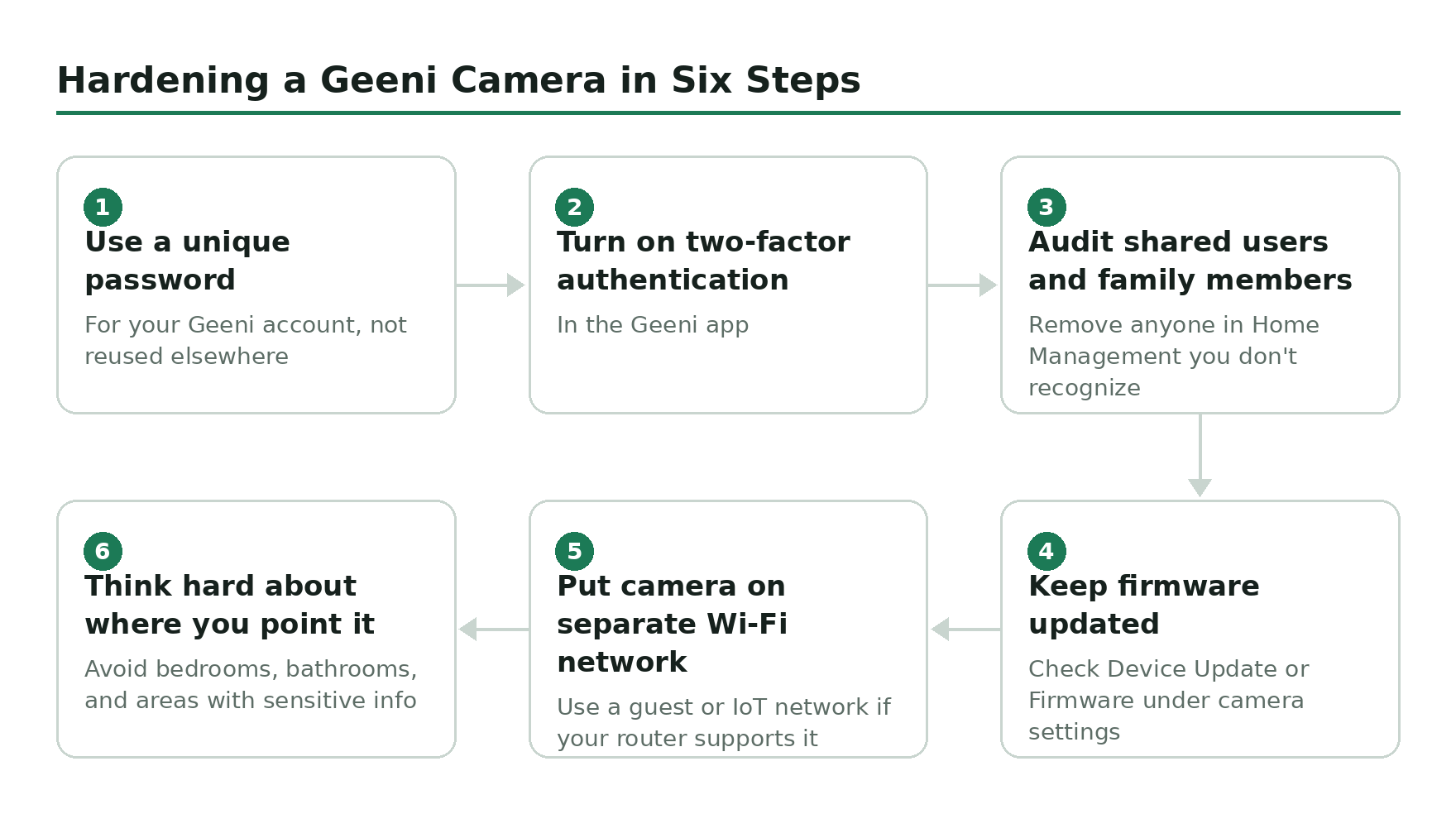
Hardening a Geeni camera in six steps
This is the actual to-do list. Do all of it. Most of it takes under a minute per step.
What to do if you think your camera is already compromised
- Unplug the camera. Physical disconnect first, questions second.
- From a different device (not the phone the Geeni app is on, just in case), log in to mygeeni.com and change your password to something new and random.
- Turn on 2FA if you hadn’t already. Yes, it’s the right time.
- In the app, remove every shared user and revoke every linked third-party integration (Alexa, Google, IFTTT). You can re-link the ones you actually want.
- Factory reset the camera (press and hold the reset pin for 10-15 seconds until it beeps or the LED flashes red and blue). Re-add it to the app after the reset completes.
- Check the same email/password combo on haveibeenpwned.com. If it shows up in any breach, change it everywhere else too.
When to switch ecosystems entirely
If the cloud-only, Tuya-based, no-published-CVE situation makes you uncomfortable, swap. Geeni is fine for “watch the porch,” but it is not the platform to bet your privacy on. Two upgrades worth the money:
- Aqara Camera Hub G3 – works with HomeKit Secure Video, processes face and gesture recognition on the device instead of in the cloud, doubles as a Zigbee hub. End-to-end encryption when paired with HomeKit, and Apple is not in the business of selling your camera feed. About four times the price of a Geeni, and worth it for anywhere you actually care about privacy.
- UniFi Protect (Ubiquiti) – all video stays on a local NVR you own, no required cloud account, no monthly fee, and the management UI is genuinely good. Much higher upfront cost (a single G5 Bullet plus a Cloud Key is several hundred dollars) but the right answer if you want serious local storage and zero third-party cloud dependency.
If you just want to keep storing Geeni footage but stop trusting the cloud as the only copy, drop a SanDisk 128GB microSD into the camera slot. Most current Geeni cameras have one. You’ll get local rolling recording even if the cloud account is compromised or the subscription lapses.
Related guides
- What is the Geeni app? – the cloud platform every Geeni camera relies on, explained.
- Geeni camera troubleshooting – work through the boring causes before assuming compromise.
- Geeni camera storage – cloud or SD card? – why local recording matters even for low-stakes use.
- Does Geeni work with Apple HomeKit? – short answer no, longer answer involves bridges.