
This post contains affiliate links. If you buy through them, DumbSwitches may earn a commission at no extra cost to you. See our full disclosure.
No. Blink cameras do not work with Apple HomeKit natively, and they never have. Blink is an Amazon-owned brand, Amazon and Apple don’t play well together at the platform level, and there’s been no announcement from either side that this is going to change. If you want a Blink camera tile in the Apple Home app, you’ll need a Homebridge box (or a HomeKit-compatible alternative camera). Here’s how each option actually works in 2026.
The short version
- Native HomeKit: no. Blink has never shipped HomeKit support on any camera, doorbell, or Sync Module.
- Matter: also no. Blink has not announced Matter support either. Matter 1.5 (released late 2025) added a camera spec, but Amazon hasn’t committed Blink to it.
- Works as a workaround: Homebridge with a community plugin. That’s it. The old IFTTT-via-SmartThings hack does not work anymore – IFTTT killed the relevant Blink and HomeKit integrations.
- Best alternative if you want real HomeKit: the eufyCam 2C Pro with HomeBase 2 (HKSV-supported), or the Aqara G2H Pro for indoor use.
Why Blink doesn’t support HomeKit
It’s an ecosystem thing. Blink has been an Amazon subsidiary since 2017, and Amazon’s strategy with its security brands (Blink and Ring) has been to keep them inside the Alexa universe. Apple HomeKit is the competing universe. Neither company has any commercial reason to make the integration work, and they haven’t.
The original Blink Indoor and Outdoor (3rd Gen) launch FAQ said the cameras “will not support Apple HomeKit or Google Assistant at launch.” That was 2020. Nothing has changed since – not for the Outdoor 4, not for the Mini 2 or Mini 2K+, not for the Video Doorbell, not for the new Outdoor 4 XR. Blink isn’t on Apple’s HomeKit accessories list, and the Blink app doesn’t expose a HomeKit pairing screen.
Matter could theoretically change that. Matter 1.5 added a camera spec in late 2025, which means a future Blink firmware could in principle expose cameras to Apple Home, Google Home, and SmartThings through one shared protocol. But Amazon hasn’t said a word about Matter on Blink. Aqara has the first Matter-over-IP camera shipping in 2026; Amazon is sitting that out for now.
The only workaround that still works: Homebridge
Homebridge is a small Node.js server you run on a device that’s always on at home – a Raspberry Pi, an old Mac, a NAS, a HOOBS box. It exposes non-HomeKit devices to the Home app as if they were native. There’s a community-maintained plugin for Blink that gets your cameras into the Apple Home tile grid: live view, motion notifications, snapshots, and arm/disarm.
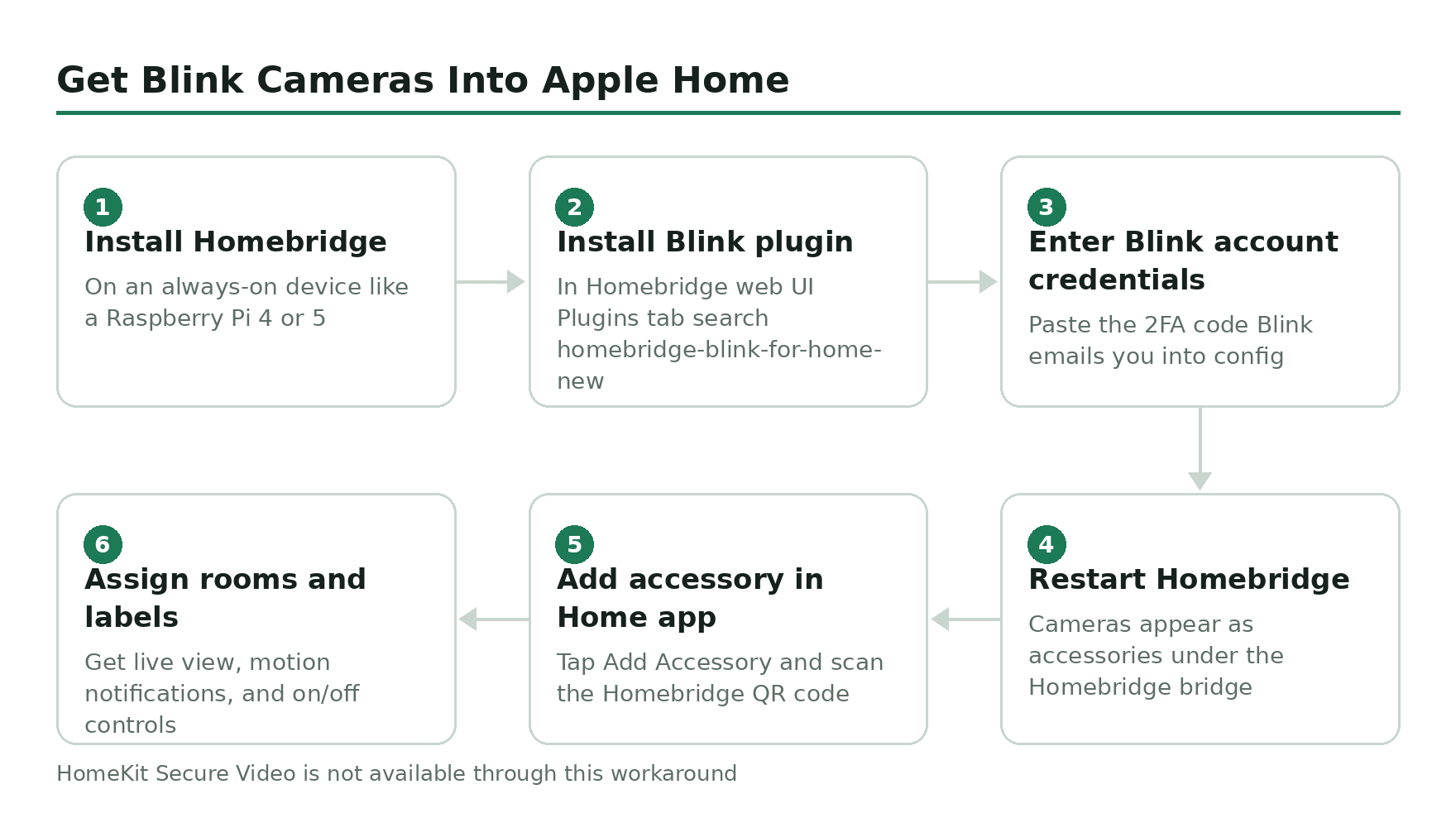
The plugin to use is homebridge-blink-for-home-new (a maintained fork of Colin Bendell’s archived original). There’s also homebridge-blinkcameras from the homebridge-plugins org. Either works. Pick one and stick with it.
Install Homebridge on an always-on device (Raspberry Pi 4 or 5 is the standard pick; an old Mac mini works fine too).
Open the Homebridge web UI and search the Plugins tab for homebridge-blink-for-home-new. Install it.
In the plugin config, enter your Blink account email and password. The plugin will trigger a 2FA email from Blink – paste that code back into the config to finish authorization.
Restart Homebridge. Your Blink cameras now show up as HomeKit accessories under the Homebridge bridge.
On your iPhone, open the Home app, tap Add Accessory, and scan the QR code on the Homebridge home screen (or in the Homebridge UI).
Assign each camera to a room and label them. You’ll see live view, motion notifications, and on/off controls.
What you do not get through Homebridge: HomeKit Secure Video. HKSV requires the camera to be on Apple’s MFi-certified accessory list, and Blink isn’t. Clips still record to Blink’s cloud (where you need a subscription to keep them) and to the Sync Module Core or XR if you’ve added local storage. The Home app tile is a live-view convenience layer, not a true HomeKit camera.
Don’t want to babysit a Raspberry Pi? HOOBS sells a preconfigured Homebridge appliance, and Scrypted is a more polished alternative that also runs on a Pi, NAS, or Mac. Same end result for Blink.
What about IFTTT and SmartThings?
Old guides (including the previous version of this page) used to suggest routing Blink through IFTTT and Samsung SmartThings to fake a HomeKit integration. Skip it. IFTTT removed the HomeKit applet support years ago, and the Blink-on-IFTTT integration is a shadow of what it used to be. SmartThings still works, but it doesn’t bridge cameras into Apple Home either. You can get Alexa routines that trigger SmartThings scenes, but you can’t get a Blink live tile in the Home app this way.
Homebridge is the only route in 2026.
Apple Watch and iPhone widgets through the Blink app
If your goal isn’t really “HomeKit” so much as “get Blink on my iPhone fast,” you don’t need any of this. The native Blink Home Monitor app for iOS supports an Apple Watch companion (motion alerts, arm/disarm, live preview thumbnails) and an iOS Home Screen widget that shows the last motion clip thumbnail and a tap-to-live-view shortcut. Both of those work without HomeKit.
For most iPhone owners who say “I want to control my Blink from my phone,” that’s already what they’re describing. The Home app integration only matters if you want every camera in one dashboard with your lights, locks, and thermostats – which is a fair goal, just a different one.
HomeKit-native cameras worth considering instead
If you haven’t bought Blink yet and HomeKit is the deciding factor, the honest answer is to buy a HomeKit camera in the first place. Here’s what’s actually shipping in 2026.
- eufyCam 2C Pro (with HomeBase 2) – the best HomeKit Secure Video option in Blink’s price band. 2K, 180-day battery, IP67, full HKSV support. The HomeBase 2 is the bridge that makes it work; don’t try this with the newer HomeBase 3, which doesn’t do HomeKit on the current generation cameras. The Eufy HomeKit story has caveats – we covered them here.
- Aqara G2H Pro – the indoor pick. 1080p HKSV with face and package recognition processed locally on your Home Hub. Doubles as a Zigbee 3.0 hub if you have other Aqara sensors. Cheap, no subscription needed for HKSV beyond iCloud+.
- Logi Circle View – was the popular HomeKit doorbell-and-camera pick, but Logitech discontinued the lineup. Don’t buy used; firmware support is on borrowed time.
If your priority is a HomeKit doorbell specifically, the Aqara G4 video doorbell and the new Eufy E340 Doorbell are the two current options. SimpliSafe doesn’t help here either – SimpliSafe doesn’t support HomeKit either – and Ring is the same story. Amazon-owned security brands as a category just don’t do HomeKit.
If you want a Blink camera anyway
Blink is still good at what it’s good at – cheap, two-year battery life, no monthly fee if you store clips locally on a Sync Module XR. The HomeKit limitation is real, but it’s not a dealbreaker if you live mostly in Alexa or you’re fine using the Blink app directly. The current-gen pick is the Blink Outdoor 4 (now bundled with the Sync Module Core), or the Outdoor 4 XR if you want the newer wider-angle sensor.
For the local-storage setup, you need the Sync Module 2 or XR plus a USB stick – the original Sync Module won’t do it. Walk through the options on our Sync Module guide before you buy.
Related guides
- Does Eufy work with HomeKit? – the closest budget alternative that actually does.
- Does SimpliSafe work with Apple HomeKit? – spoiler, no, but for different reasons.
- Does Ring work with Apple HomeKit? – the other Amazon-owned brand with the same problem.
- The Blink Sync Module explained – which one you need and why.
- What a red light on your Blink camera means – if you’re troubleshooting, start here.