

This post contains affiliate links. If you buy through them, DumbSwitches may earn a commission at no extra cost to you. See our full disclosure.
Vivint does not natively support Apple HomeKit. There is no official integration, no HomeKit certification on any Vivint hardware, and Vivint has not signaled any plans to add one – no Matter support either, as of 2026. If you are shopping for a security system with first-class HomeKit support, Vivint is not it.
That said, there is a working workaround using Homebridge – and if you are already locked into Vivint, it is worth knowing about.
Vivint’s Ecosystem – What It Actually Works With
Vivint is built around its own closed ecosystem. The Vivint app handles most of the day-to-day control, but the system does connect to a handful of third-party platforms:
- Amazon Alexa – voice control works, including for arming/disarming and device commands. One caveat: Vivint dropped support for Amazon’s newer Alexa+ tier in November 2025 due to data access concerns. Standard Alexa continues to work.
- Google Assistant – voice control supported, including through Google Home speakers and displays.
- Google Nest Thermostats – can be integrated into Vivint automations.
- Philips Hue – Hue lighting works alongside Vivint.
- Z-Wave and proprietary Vivint hardware – the core of the system. This includes the Doorbell Camera Pro, Outdoor Camera Pro Gen 3, Indoor Camera, smart locks, and the Smart Hub control panel.
Apple HomeKit is not on that list, and has never been. Vivint has never joined Apple’s MFi program for home devices.
Any HomeKit Path?
Yes, but it requires running Homebridge – a free, open-source bridge server that translates non-HomeKit devices into something Apple Home can understand. Two community plugins do the actual work, and which one you pick matters more than most Homebridge guides let on.
The Two Forks, Compared Honestly
timcharper/homebridge-vivint is the original. It was written by a former Vivint employee, and it’s the plugin most older setup guides still point to. It works, but its own repository shows less recent commit activity than the fork below – most of the maintenance energy in the project has moved elsewhere.
balansse/homebridge-vivint is that “elsewhere.” It’s a fork published on npm as @balansse/homebridge-vivint, and as of 2026 it’s the one with actual signs of life – open issues and commits as recently as May and June 2026, versus a much quieter history on the original. The fork also adds two things the original doesn’t have: a device ignore-list (useful if you’re already handling a thermostat or garage door through a different integration and don’t want Homebridge fighting over it) and dynamic accessory cache management, so devices you remove from Vivint don’t linger as ghost entries in Apple Home. Some of balansse’s fixes have even been submitted back as pull requests against the original timcharper repo, which tells you where the active development is actually happening.
Practical takeaway: start with the balansse fork. If you hit a wall, the original is still there as a fallback, but it’s not the one getting fixes.
What Actually Shows Up in Apple Home
The plugin exposes more of the Vivint system than people expect. Once it’s running, Apple Home can see:
- The security panel – arm home, arm away, and disarm all work as a standard HomeKit alarm accessory, controllable by Siri.
- Door and window sensors – contact sensors report open/closed state.
- Smart locks – lock and unlock from the Home app or Siri.
- Motion, glass-break, smoke, CO, and heat/freeze sensors – all surface as HomeKit sensor accessories.
- The garage door opener and any Z-Wave switches or dimmers tied to the Vivint hub.
- The thermostat – temperature and mode control.
- Cameras and the doorbell – live streaming, either pulled from Vivint’s servers or directly from the panel depending on how you configure it.
The camera piece needs a caveat. You get a live view and motion clips inside the Home app, which is genuinely useful. What you don’t get is HomeKit Secure Video – the plugin isn’t a certified HKSV camera, so there’s no encrypted recording to your iCloud storage the way a native HKSV camera would provide. If iCloud-backed camera recording is the point of switching to HomeKit, a Homebridge-bridged Vivint camera won’t deliver it.
The plugin’s own documentation is upfront about one more limitation: Vivint’s motion event reporting over its API can be inconsistent, so automations that trigger only off motion sensors are worth testing before you rely on them for anything important.
These plugins work for a lot of people, but this is community software – not an official Vivint product. Vivint could break compatibility at any time by updating their API, and there would be no guarantee of a fix.
If that tradeoff is acceptable, here is how to set it up.
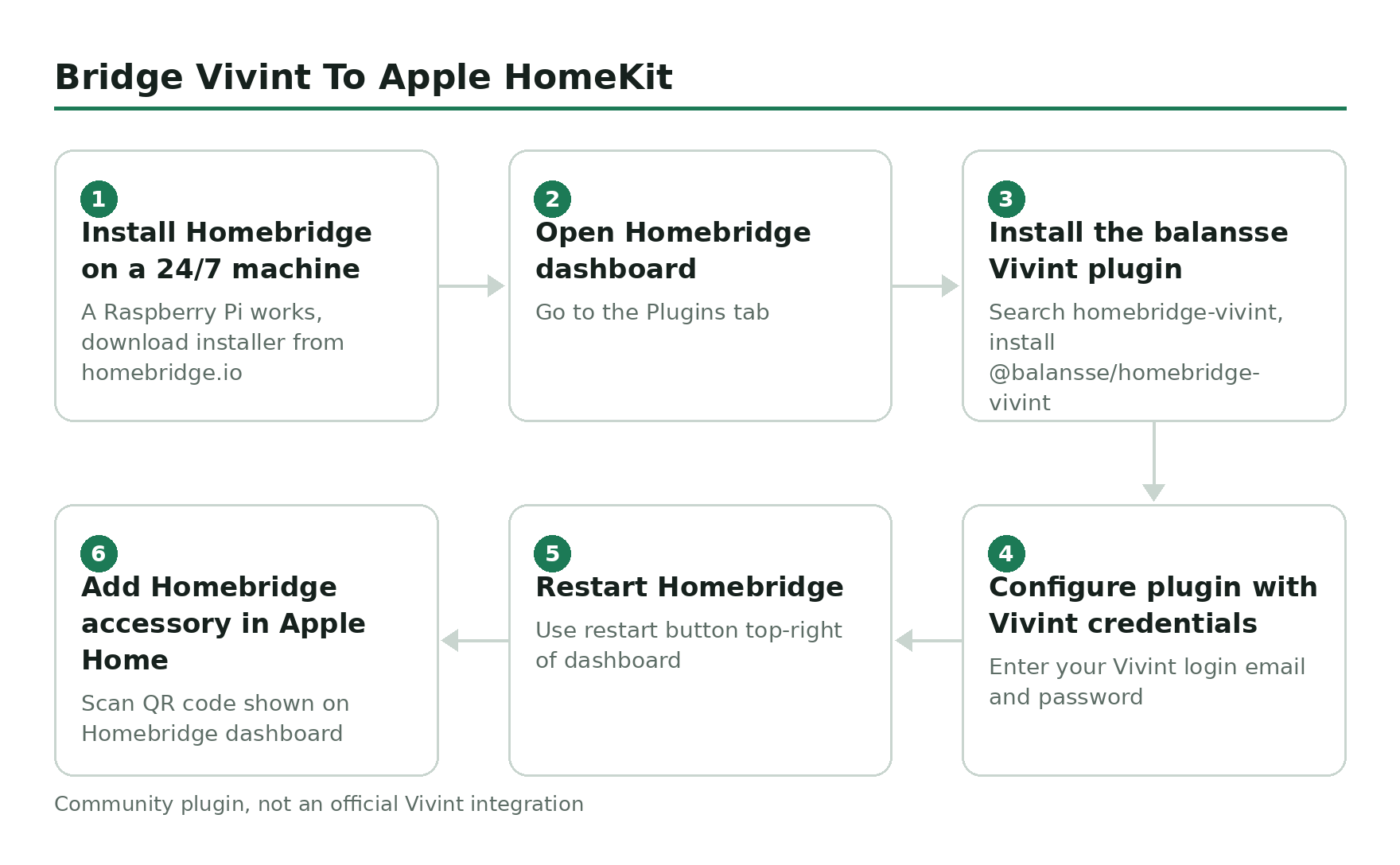
Install Homebridge on a machine that runs 24/7.
A Raspberry Pi works well. Download the installer at homebridge.io – there are guides for Windows, macOS, and Linux.
Open the Homebridge dashboard and go to Plugins.
Search for homebridge-vivint and install the @balansse/homebridge-vivint plugin.
Configure the plugin with your Vivint account credentials.
The plugin will ask for your Vivint login email and password. It uses Vivint’s own API to pull in your devices.
Restart Homebridge.
Use the restart button in the top-right of the dashboard.
Open the Apple Home app and add the Homebridge accessory.
Scan the QR code displayed on your Homebridge dashboard. Your Vivint devices should appear in Apple Home within a few seconds.
Three Ways to Handle It
Zoomed out, there are really only three approaches if you own or are considering Vivint and care about HomeKit:
| Approach | Effort | What You Get | Risk |
|---|---|---|---|
| Stick with the Vivint app only | None | Full Vivint feature set, Alexa/Google voice control | No Siri, no Home app, no HomeKit automations |
| Homebridge + balansse fork | Moderate – needs a Pi or always-on machine | Panel, sensors, locks, cameras (no HKSV) in Apple Home | Unofficial; breaks if Vivint changes its API |
| Switch to a HomeKit-native system | High – new hardware, possible contract exit | Certified HomeKit support, HKSV-eligible cameras | Cost and installation effort, loses Vivint’s monitoring quality |
If HomeKit Is a Priority, You Have Better Options
Vivint is a professionally monitored, closed-loop system. That is its design choice, and it is a deliberate one. The hardware and monitoring quality are genuinely good – the Doorbell Camera Pro has best-in-class field of view at 180×180 degrees, and the Outdoor Camera Pro Gen 3 is among the sharper options in the professionally installed category.
But closed ecosystems come with a cost. If you are already in the Apple ecosystem and want your security system to live natively in the Home app – without a third-party server running on a Raspberry Pi – Vivint is the wrong choice.
Systems built with native HomeKit in mind include SimpliSafe (with HomeKit support added to newer hardware), and a growing list of standalone cameras and sensors from Aqara and Eve that are HomeKit-certified from the factory.
The honest question to ask before signing a Vivint contract: is the professional monitoring and installation worth giving up native HomeKit? For some people the answer is yes. For committed Apple Home users, probably not.