

This post contains affiliate links. If you buy through them, DumbSwitches may earn a commission at no extra cost to you. See our full disclosure.
Both are good thermostats. The real question is which ecosystem you live in, whether you want room sensors included in the box, and how much you care about native Apple Home support versus the bare-minimum version Matter gives you.
Quick Verdict: Who Should Buy Which
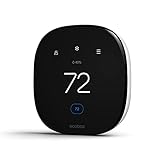
Buy the Ecobee if you use Apple HomeKit, want room-by-room temperature control out of the box, or don’t have a C-wire and don’t want to deal with a Google-specific adapter.
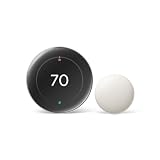
Buy the Nest if your home runs on Google devices, you want a thermostat that learns your schedule automatically, or you care about minimal design more than features.
Either way, you’re getting ENERGY STAR certification, solid app control, and a big upgrade over whatever builder-grade thermostat you’re replacing. For the actual dollar figures behind that upgrade, see whether smart thermostats are worth it.

What Actually Separates Them in 2026
Both lines got real updates this cycle, and it changed the comparison in ways most write-ups haven’t caught up to. Nest shipped Matter support as a firmware update, so a Nest thermostat can now join an Apple Home network directly, no bridge required. Ecobee has HomeKit built in the way it always has. Those sound similar. They aren’t.
Matter’s thermostat profile is narrow by design. It hands over mode switching (heat, cool, off) and setpoint control, plus a current-temperature reading. That’s it. Room sensor logic, energy reports, geofencing, and the learning algorithm all stay locked inside each brand’s own app, because Matter doesn’t have a standard way to describe any of that yet. So a Nest thermostat added to Apple Home over Matter will let you say “set the thermostat to 68” through Siri, but you’re still opening the Google Home app for anything more interesting.
Ecobee’s HomeKit integration predates Matter and exposes more of the thermostat natively – modes, setpoints, and current temperature show up the same way, but the SmartSensor data and comfort settings are still Ecobee-app-only. Neither brand gives Apple Home full parity with its own app. Ecobee’s version has just had a decade longer to mature.
Ecobee vs Nest: Side-by-Side
| Category | Ecobee (Enhanced / Premium) | Nest (Learning Thermostat 4th gen) |
|---|---|---|
| Ecosystem strength | Native HomeKit, works fine with Alexa and Google Assistant | Deepest with Google Home; Alexa and HomeKit via Matter |
| Matter support | Added via firmware update; exposes mode and setpoint | Added via firmware update; exposes mode and setpoint |
| Apple HomeKit | Native, no bridge or workaround needed | Matter only – no native HomeKit, and the old Starling Home Hub bridge was discontinued in September 2025 |
| Room sensors | SmartSensor included on Enhanced and Premium; averages selected sensors, with Follow Me weighting toward occupied rooms | Nest Temperature Sensor sold separately, up to 6 per thermostat; simple average of whichever sensors you select, no occupancy weighting |
| Subscription | None required for core thermostat function; Ecobee+ adds extras like Alexa-built-in features on some models | None required for core thermostat function; Google Home Premium (formerly Nest Aware) is a camera/doorbell subscription, not a thermostat gate |
| C-wire | Power Extender Kit included in the box | Nest Power Connector sold separately, installs at the furnace |
Where Ecobee Wins
Ecobee ships with a SmartSensor in the box on the Enhanced and Premium models. That’s a room sensor that reads temperature and occupancy in a second room – so if your bedroom runs hot while the living room is fine, the Ecobee actually accounts for that. When more than one sensor is active, the thermostat averages them; with Follow Me turned on, it weights toward whichever room actually has someone in it. Turn Follow Me off and it just averages everything equally. The Nest doesn’t include anything comparable at the same price – Nest Temperature Sensors are sold separately and only work with the Learning Thermostat (3rd and 4th gen) and Nest Thermostat E, not the base Nest Thermostat.
HomeKit support is native on Ecobee. Not bolted on, not via a bridge – it just works with Apple Home from setup, and has for years. If you’re pairing it with geofencing specifically, see our walkthrough of setting up Ecobee geofence with HomeKit. The Nest now joins Apple Home too, but only through Matter’s stripped-down thermostat profile – mode and setpoint, nothing else – and only after years without any first-party path at all. The stopgap plenty of people used in the meantime, the Starling Home Hub, stopped being sold in September 2025 when tariffs made it unprofitable to build. If you were counting on picking one up used, check our full rundown of whether Nest actually works with HomeKit for the current state of every workaround.
The Ecobee app is more feature-rich. You can set ventilation schedules, see detailed energy reports, configure the SmartSensor logic, and dig into occupancy-based automation. It’s a lot of knobs, but they’re all there if you want them.
Where Nest Wins
Nest’s learning schedule actually works. It watches your adjustments for a week, figures out your patterns, and stops asking you to set anything manually. If your schedule is consistent, the Nest will figure it out without a thermostat app tutorial.
The design is cleaner. Nest thermostats look like something an interior designer put there on purpose. Ecobee looks more like a tablet on your wall – functional, not ugly, but obviously a tech device.
If your home is already built around Google – Chromecast, Nest speakers, Google Home routines – the Nest integrates more deeply. Google Home automations work more naturally when the thermostat is also a Google product. And if you’re already paying for a camera or doorbell subscription, the October 2025 rename to Google Home Premium didn’t change what the thermostat itself needs – the core scheduling and setpoint features have never required a subscription on either brand. Google Home Premium buys you camera history and AI-generated event descriptions, not thermostat features.
Compatibility: What You Need to Know
Both work with Alexa, Google Home, and Apple Home. That part is settled – you’re not giving anything up on voice assistant compatibility with either choice. What differs is how much of the thermostat each integration actually exposes, which is the Matter limitation covered above.
C-wire is where things get annoying. If your current thermostat doesn’t have a C-wire (common in older homes), you’ll need to deal with it. Ecobee includes a Power Extender Kit in the box that works without one. Nest requires a Nest Power Connector, a separate piece of hardware that attaches at the furnace, air handler, or zone controller. It’s sold separately and works with standard 24 VAC systems, not millivolt or high-voltage setups. Both solutions work fine once installed; Ecobee’s is just already in the box.
Both are compatible with most forced-air, heat pump, and gas systems. Neither works with high-voltage heating systems (baseboard, electric radiant). Check the compatibility tool on each manufacturer’s website before buying if you’re unsure. For a wider comparison that includes a third option built for multi-zone homes, see our best smart thermostats roundup.

App and Long-Term Use
The Ecobee app gives you more data. Energy reports, hourly temperature history, SmartSensor readings, occupancy tracking – it’s the kind of thing you’ll look at obsessively for the first month and then reference maybe once a quarter. Still useful when you need to troubleshoot or optimize.
The Nest app is simpler. Most of what you need is on the home screen. It’s less powerful but requires less configuration time to feel like it’s set up correctly. If you want a thermostat that you touch once and forget about, Nest gets out of the way faster.
Choose Ecobee If…
- You use Apple HomeKit and want it to work without a bridge, a workaround, or a discontinued hub
- You have rooms that run hotter or colder than the rest of the house and want that solved out of the box
- You don’t have a C-wire and don’t want a second piece of hardware at the furnace
- You want to see the full data – energy reports, occupancy history, sensor-by-sensor readings
Choose Nest If…
- Your home already runs on Google Home, Chromecast, and Nest speakers
- You want the thermostat to learn your schedule automatically
- Design matters more to you than feature depth
- You’d rather glance at a simple app than dig through an energy dashboard
Frequently Asked Questions
Does Nest work with Apple HomeKit now?
Only through Matter, and only for the basics – mode switching, setpoint, and current temperature. There’s still no native Nest-to-HomeKit integration the way Ecobee has always had. The Starling Home Hub used to bridge the gap with more complete access, but it was discontinued in September 2025 and is no longer sold. See our full breakdown at does Nest work with HomeKit.
Do I need a subscription to use either thermostat’s core features?
No. Scheduling, setpoints, remote control, and the learning algorithm on Nest all work without paying anything extra. Google Home Premium (the October 2025 rename of Nest Aware) is a camera and doorbell subscription that adds video history and AI event descriptions – it doesn’t gate anything on the thermostat itself.
How do room sensors actually decide the temperature?
Both brands average the readings from whichever sensors you’ve selected for the active schedule slot. Ecobee’s Follow Me feature adds occupancy weighting on top of that average, favoring rooms that show activity over ones that don’t; turn it off and it’s a flat average. Nest’s Temperature Sensors do a flat average across up to 6 sensors with no occupancy layer. Neither system reads every room simultaneously – they only average the sensors you’ve told them to use for that time slot.
What if I don’t have a C-wire?
Ecobee includes a Power Extender Kit in the box that solves this without an electrician. Nest requires the Nest Power Connector, sold separately, which attaches at the furnace or air handler. Both work on standard 24 VAC systems; neither works on millivolt or high-voltage setups like baseboard or electric radiant heat.
Is a smart thermostat actually worth the switch?
Generally yes, and the savings are backed by verified data. See the full figures in are smart thermostats worth it.
Which One to Buy
For most people, the Ecobee Enhanced is the better buy. The included SmartSensor alone is worth the choice – it solves a real problem most thermostat comparisons ignore. Native HomeKit support means one less integration to worry about, and it’s not dependent on a third-party bridge that can disappear the way Starling did. The Power Extender Kit handles the C-wire situation cleanly, in the box, with nothing extra to buy.
Get the Nest if you’re already deep in the Google ecosystem and want a thermostat that fades into the background. The learning schedule is genuinely good, the design is better, and if you use Google Home routines throughout your house it’ll fit more naturally. Just don’t buy it expecting full HomeKit integration – Matter gets you the basics, not parity with the Google Home app.
One other option worth knowing about: if you’re running a large home with multiple zones, the Honeywell Home T9 handles multi-zone setups better than either of these and also uses room sensors. It’s not as polished, but it’s the right tool for complex HVAC systems. See our full breakdown of the Honeywell Home lineup for specs on the T6 Pro and RTH9585WF too. And if HomeKit compatibility across your whole house – not just the thermostat – is the deciding factor, our full list of HomeKit compatible devices covers where else Ecobee’s head start over Nest actually matters.