

This post contains affiliate links. If you buy through them, DumbSwitches may earn a commission at no extra cost to you. See our full disclosure.
Some Eufy products work with Apple HomeKit, but the list is shorter than Eufy’s marketing implies and the rules are fiddly. HomeKit works on a specific slice of Eufy’s older cameras (paired with a HomeBase 2), the current eufyCam S3 Pro, the E30/E31/C34 smart locks, and three newer devices that shipped through the first half of 2026 with “Works with Apple Home” printed on the box – though the actual HomeKit support on two of the three is still missing in action. The flagship eufyCam S330 (eufyCam 3) and most current S350-series indoor cams do not officially support HomeKit, even with HomeBase 3.

The honest answer (so you can stop scrolling)
Yes, Eufy works with HomeKit – on the right hardware, with the right hub. Eufy’s HomeKit story used to be one of the better ones in budget security. Then they shipped HomeBase 3, made it the centerpiece of the new flagship cameras, and quietly never finished HomeKit support on the new hub. So if you walk into this expecting every Eufy product to drop into the Home app, you’ll be disappointed.
Here’s the short version, by category.
- HomeKit (native): eufyCam 2, 2C, 2 Pro, 2C Pro (require HomeBase 2); Indoor Cam 2K and Indoor Cam Pan & Tilt 2K; IndoorCam E30; eufyCam S3 Pro; Smart Lock E30, E31, C34.
- HomeKit Secure Video (HKSV): eufyCam 2 / 2C / 2 Pro / 2C Pro, plus the Indoor Cam 2K and Indoor Cam Pan & Tilt 2K. That’s it.
- Shipped in 2026, HomeKit still pending: Video Doorbell S4 and Solar Wall Light Cam S4. Both were announced at CES 2026 with Apple Home printed on the spec sheet; neither had working Apple Home support at launch.
- Shipped in 2026, Matter (not native HomeKit): Smart Lock / FamiLock E40 – lock functions bridge into Apple Home via Matter; the built-in camera and doorbell do not.
- No HomeKit support: eufyCam S330 (eufyCam 3), the S350 outdoor lineup, RoboVacs, smart scales, smart plugs, and most older Indoor Cam C-series models. HomeBase 3 itself does not bridge cameras to HomeKit.
The rest of this post is for people who want the specifics – which model does what, how to set it up, how the pairing works under the hood, and what the 2022 encryption mess changed.
Which Eufy cameras officially support HomeKit in 2026
Eufy maintains a single support page that lists the HomeKit-compatible lineup. As of July 2026, it covers eight devices.
- eufyCam 2C and 2C Pro – the workhorse outdoor pair. 1080p (2C) or 2K (2C Pro), 180-day battery life, IP67, full HKSV support when paired with HomeBase 2.
- eufyCam 2 and 2 Pro – the older 365-day-battery siblings. Same HomeKit/HKSV story, same HomeBase 2 requirement.
- Indoor Cam 2K and Indoor Cam Pan & Tilt 2K – the two indoor models that get HKSV. Wired, not battery.
- IndoorCam E30 – newer indoor cam, HomeKit-compatible but check the box for the HKSV badge before you buy.
- eufyCam S3 Pro – the only current-gen Eufy outdoor camera with native HomeKit support. 4K with dual-camera color night vision. Pairs with HomeBase 3 for storage; HomeKit works directly without a HomeBase 2 in the picture.
- Smart Lock E30, E31, and C34 – all three support HomeKit. The E30/E31 add fingerprint readers; the C34 is the budget pick.


Notice what’s missing: the eufyCam S330 (which Eufy also markets as eufyCam 3) is not on this list. Neither are the S350 outdoor cams, the SoloCam series, the Floodlight Cam 2 Pro, or any of the smart plugs and scales. If you want HomeKit and you’re shopping new, the S3 Pro is the camera, full stop. For how the rest of the smart-home market handles Apple’s ecosystem, see our full list of HomeKit compatible devices.
The HomeBase 2 vs HomeBase 3 trap
This is where most Eufy + HomeKit threads on Reddit go off the rails. The two hubs behave differently with Apple.
- HomeBase 2 is the bridge that takes the eufyCam 2/2C/2 Pro/2C Pro and the older indoor cams into HomeKit and HKSV. Without it, those cameras don’t talk to Apple at all.
- HomeBase 3 is the storage powerhouse for the S330, S350, and S3 Pro lineup. It does not bridge cameras into HomeKit. The S3 Pro talks to HomeKit directly; the S330 and friends don’t talk to HomeKit at all.
So if you own a HomeBase 3 and an S330 and you’re searching “why won’t my eufyCam show up in Home app” – that’s the answer. It isn’t supposed to. Eufy has been promising HomeKit on HomeBase 3 since 2023 and hasn’t delivered. Treat the S330 as an Alexa/Google/Eufy-app camera and move on.
Why “the HomeBase bridges the cameras” is more than marketing language
Here’s the mechanical part nobody bothers to explain, and it’s the actual reason HomeBase 3 keeps missing its own deadlines. HomeKit doesn’t let an accessory join your home by handing over a password once and trusting it forever. Apple’s HomeKit Accessory Protocol requires every accessory to run a specific cryptographic handshake, and a HomeBase has to implement the whole thing correctly for every camera it fronts.
Pairing setup runs a modified version of Stanford’s Secure Remote Password protocol – SHA-512 instead of SHA-1, a 3072-bit modulus – so your iPhone and the HomeBase can both prove they know the setup code without that code ever crossing the network. That only happens once. Every session after that gets re-verified from scratch: a fresh Curve25519 key exchange, a session key derived through HKDF-SHA-512, and everything encrypted with ChaCha20-Poly1305. None of that is optional for HomeKit certification, and it’s why a HomeBase shows up in the Home app as a single bridge accessory with your cameras nested underneath it, instead of each camera pairing to your phone on its own.
Implementing that handshake correctly, on a schedule, for every camera behind the bridge is apparently the hard part. HomeBase 2 has had years to get it right. HomeBase 3 still hasn’t shipped it for the cameras that need it.
HomeKit Secure Video: what you get
HKSV is the reason to pick HomeKit over Alexa or Google Home for a security camera in the first place. We cover the full mechanics – the on-device motion analysis, the end-to-end iCloud encryption, why a Home Hub is mandatory – in our HomeKit Secure Video guide. The short version, three things happen when a camera supports it:
- Motion clips get analyzed on-device (people, animals, packages, vehicles) and stored end-to-end encrypted in iCloud.
- 10 days of clip history come free with any iCloud+ plan, even the 50 GB tier. Recordings don’t count against your storage.
- You can set per-camera schedules and Activity Zones from the Home app instead of the Eufy app.
On Eufy, HKSV only works on the eufyCam 2 / 2C / 2 Pro / 2C Pro and the two 2K Indoor Cams. The S3 Pro supports HomeKit for live view and notifications but does not show up in Apple’s HKSV-eligible list – clips still record to your HomeBase 3. If you specifically want HKSV, buy a 2C Pro kit. If you want 4K and HomeKit live view, the S3 Pro is the only current option.
What’s new for 2026 (and what shipped)
At CES 2026, Eufy announced three new HomeKit-adjacent devices. All three have since shipped, and the gap between the CES announcement and the actual firmware is a decent case study in why “works with Apple Home” on a spec sheet is not the same as HomeKit working.
- Video Doorbell S4 – 3K, 9MP sensor, 180-degree panoramic view, a rotating camera that tracks visitors across the porch. Shipped at the end of March 2026 ($279.99 US retail, cheaper direct from eufy.com). The spec sheet promises Apple Home and HomeKit Secure Video via HomeBase 3. Reviewers who bought one at launch found no Apple Home support at all, with Eufy pointing to “a future firmware update” and no date attached. As of this writing, that update hasn’t landed. Treat the HomeKit claim on the box as a roadmap item, not a feature.
- Solar Wall Light Cam S4 ($199.99) – 4K pan-and-tilt with a detachable solar panel and a built-in RGBWW sconce light. Also shipped in Q1 2026 with the same “Apple Home and HKSV via HomeBase 3” promise on the spec sheet. No independent reviewer has confirmed working Apple Home support on this one either.
- Smart Lock E40 (marketed as the FamiLock E40, $299) – fingerprint and facial recognition, built-in 2K camera and doorbell, a radar sensor for motion detection. This one is a Matter play, not a native-HomeKit one. It launched as a Home Depot exclusive in mid-June 2026, with a wider Amazon and direct-to-consumer rollout landing this month. Matter gets the lock function – lock, unlock, basic automations – into Apple Home, Alexa, Google Home, and SmartThings. It does not get the built-in camera or doorbell into Apple Home: Matter 1.5 added a camera and doorbell data model, but Apple hasn’t implemented support for it yet, and SmartThings is currently the only platform that has. On an iPhone, the E40 behaves like a Matter lock with a camera you can only see inside the Eufy app.


The pattern across all three is consistent: Eufy prints “Works with Apple Home” on the box before the firmware backs it up. If HomeKit is the reason you’re buying, wait for a reviewer who has paired the thing to confirm it, not the CES press release.
Eufy products that do NOT work with HomeKit
Save yourself a return shipment by skipping these if HomeKit is your priority:
- eufyCam S330 (eufyCam 3) and the S330 wired equivalents – HomeKit was promised, never shipped.
- S350 lineup (4K outdoor, indoor pan-and-tilt variants) – same story.
- SoloCam series – the standalone wireless cams with no HomeBase requirement. Native HomeKit not supported.
- Floodlight Cam 2 / 2 Pro – works with Alexa and Google, not Apple.
- RoboVac lineup – none of them speak HomeKit natively. A Homebridge plugin gets you there if you run an always-on Mac or Raspberry Pi, but that’s a project, not a feature.
- Smart Plugs – work with Alexa, Google Assistant, and the eufy app. No HomeKit. Matter has not been added to the existing models.
- Smart Scales – syncs to Apple Health, which is a separate Apple framework from HomeKit. Don’t confuse the two.
- eufy Baby Monitors – despite earlier rumors, the SpaceView and current monitors don’t ship with HomeKit support.

How to set up a Eufy camera with HomeKit
This works for the eufyCam 2 / 2C / 2 Pro / 2C Pro family on HomeBase 2. The S3 Pro setup is similar but skips the HomeBase 2 step.
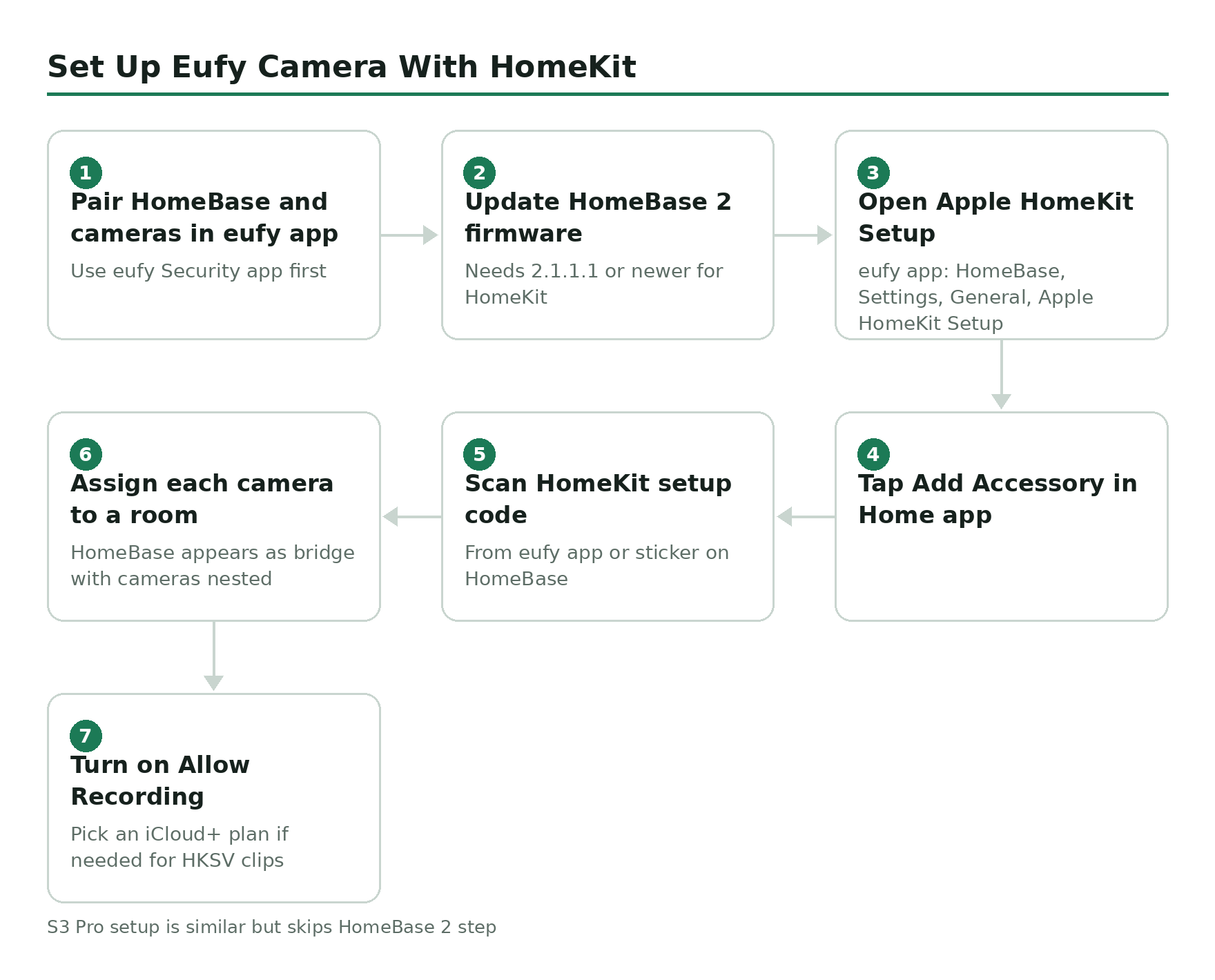
Pair the HomeBase 2 and cameras in the eufy Security app first.
Update HomeBase 2 firmware to the latest version (HomeKit support requires firmware 2.1.1.1 or newer).
In the eufy Security app, tap the HomeBase, then Settings, then General, then Apple HomeKit Setup.
Open the Apple Home app on your iPhone or iPad and tap Add Accessory.
Scan the HomeKit setup code shown in the eufy app (or on the sticker on the HomeBase itself).
Assign each camera to a room and label them. The HomeBase appears as a single bridge with each camera nested underneath.
In Home app camera settings, turn on Allow Recording and pick an iCloud+ plan if you don’t already have one. HKSV clips appear under each camera tile after a minute or two.
If the HomeBase 2 doesn’t appear when you tap Add Accessory, the most common cause is being on a different Wi-Fi band. The HomeBase 2 is 2.4 GHz only; your iPhone needs to be on the same 2.4 GHz network during pairing, or on a unified SSID with both bands.
HomeKit Secure Video not recording: fixes that work
If the cameras show up in the Home app but the clips never arrive, work through this list in order. The first two solve about 80 percent of the reports on Eufy’s own forum.
Confirm Allow Recording is on. Open Home app, long-press the camera, tap the gear, scroll to Recording Options, set to Stream & Allow Recording.
Check your iCloud+ plan is active and the Home Hub (HomePod, Apple TV, or iPad) is online. HKSV requires a Home Hub – it cannot record without one.
Update HomeBase 2 firmware in the eufy app under Device Settings, then General, then Firmware Upgrade.
Reboot HomeBase 2 (unplug power for 30 seconds, plug back in). Cameras re-link automatically.
In the Home app, remove the HomeBase bridge, then re-add it from the eufy app’s HomeKit Setup screen. This rebuilds the HomeKit pairing without resetting Eufy app settings.
If clips still don’t record, turn Allow Recording off and back on after 30 seconds. Apple’s HKSV pipeline occasionally needs a kick.
If the cameras still won’t record after all that, the issue is usually a HomeBase firmware regression. Eufy has shipped a few of those over the years. Roll back is not a self-serve option – open a ticket with Eufy support and reference your HomeBase serial.
About the 2022-2023 encryption mess
Every Eufy thread eventually gets here, so here are the facts, once. In late 2022, security researcher Paul Moore demonstrated that some Eufy cameras were sending thumbnail data to the cloud despite marketing claims of local-only storage, and that web-portal video streams weren’t end-to-end encrypted. Anker (Eufy’s parent) initially denied it, then admitted it. The fix that followed: WebRTC-encrypted streams for the web portal, an external security audit, and a bug bounty program.
The regulatory tail took over two years to catch up. In January 2025, the New York Attorney General’s office announced a $450,000 settlement with the three companies that distribute Eufy products in the US, after finding that video streams still weren’t consistently protected by end-to-end encryption and that active feeds could be viewed without authentication by anyone who had the right URL. The settlement requires ongoing penetration testing and encryption of video both in storage and in transit – it’s an enforcement outcome, not a one-time fine that made the problem disappear.
Is Eufy trustworthy now? More than they were in 2022, less than the marketing claims. If you specifically don’t want any Eufy traffic touching the cloud, HKSV is your best route – Apple’s pipeline encrypts clips end-to-end with your iCloud key, and the camera only talks to your Home Hub on the local network for analysis. That’s the strongest privacy story you can get from a Eufy camera in 2026.
What I’d buy in 2026
If you want HomeKit and you’re starting from scratch:
- Best for HKSV on a budget: eufyCam 2C Pro 2-cam kit. Older hardware, but HKSV works, 2K resolution is plenty, batteries last six months.
- Best current-gen HomeKit camera: eufyCam S3 Pro. 4K dual-cam color night vision, HomeKit live view, but no HKSV. Pricier.
- Best indoor HKSV: Indoor Cam Pan & Tilt 2K. Cheap, wired, HKSV-eligible.
- If you want a Matter-native lock: Smart Lock E40. Lock and unlock work fine in Apple Home; the built-in camera and doorbell stay eufy-app-only until Apple adds Matter camera support.
- Skip for now if you want HomeKit: the Video Doorbell S4 and Solar Wall Light Cam S4. Both shipped promising Apple Home support that, as of this writing, neither has delivered. Buy them for the camera hardware, not the HomeKit checkbox.
- Skip entirely if you want HomeKit: any S330 / S350 / SoloCam / Floodlight Cam 2 / Smart Plug / RoboVac. None of these are getting native HomeKit anytime soon.