

This post contains affiliate links. If you buy through them, DumbSwitches may earn a commission at no extra cost to you. See our full disclosure.
A green light on a Blink camera almost always points to one specific model family – the Blink Mini line – and almost always means one of two things: the camera is in pairing mode (solid green plus blinking blue), or it fell offline and is trying to crawl back onto your Wi-Fi (blinking green). The battery-powered Outdoor, Indoor, and XT models don’t use a green LED at all. So step one is knowing which camera you’ve got.
Last updated: May 2026. Verified against Blink’s official LED documentation, covering the Mini, Mini 2, Mini 2K+, Mini Pan-Tilt, and the Blink Arc (which is two Mini 2K+ cameras stitched together).
The quick decoder
If your camera is a Mini, Mini 2, Mini 2K+, Mini Pan-Tilt, or one of the two halves of a Blink Arc, this list covers every green LED state Blink officially documents.
- Blinking green – the camera fell offline and is trying to reconnect to your Wi-Fi. This is the one you’re probably here for.
- Solid green plus blinking blue – the camera is in pairing mode, ready to be set up in the Blink app.
- Solid green by itself – not a standard Blink state. If you’re seeing a steady green and nothing else, the camera is most likely sitting in pairing mode and the blue indicator hasn’t kicked in yet, or you’re looking at it from the wrong angle. Wait a few seconds and check again.
- No LED at all – it’s online and working normally. Or it’s unplugged. One of those.
If you own a Blink Outdoor (3rd Gen, Outdoor 4, or Outdoor 2K+), Indoor, XT2, or XT, you won’t see a green light from these cameras under any normal circumstance. Those models communicate with red and blue only. If you’re seeing green on one of those, it’s almost certainly a reflection or a neighbor’s LED. Check the model name on the back of the camera or in the app’s device settings before troubleshooting any further.
Blinking green on a Blink Mini, Mini 2, or Mini 2K+
This is the common one. Per Blink’s official support docs, a blinking green LED means the Mini has fallen offline and is attempting to reconnect to the network it joined the first time. It will keep trying on its own. Most of the time it sorts itself out within a minute or two. When it doesn’t, the cause is one of four things, in roughly this order of likelihood:
- Your home internet briefly dropped (the most common cause – check your phone or laptop on the same network).
- Your router rebooted itself (firmware updates love to do this at 4 a.m. without telling you).
- Your Wi-Fi password changed and the Mini never got the memo.
- The Mini is too far from the router and the signal isn’t strong enough to hold a connection.
Blink server outages can also cause this, though they’re rare. If you’ve got more than one Blink camera and all of them dropped at the same time, that’s a clue it’s on Blink’s end, not yours. Otherwise, treat it as a local network problem.
The fix, in the order that actually works
Most blinking-green situations resolve on their own once the underlying network problem is sorted. Try these in order. About 80 percent of cases get fixed by step two.
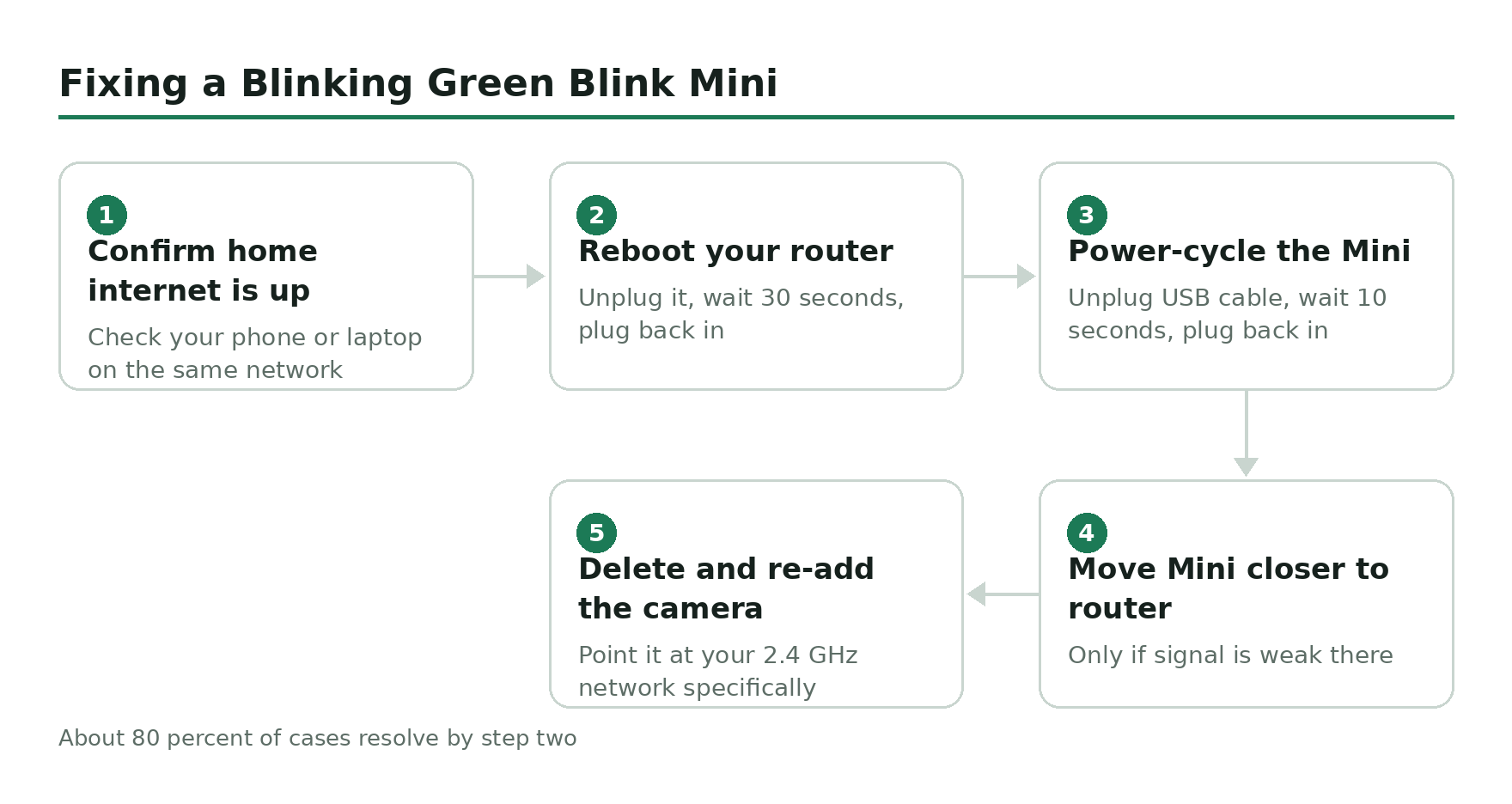
Confirm your home internet is actually up.
Reboot your router. Unplug it, wait 30 seconds, plug it back in.
Power-cycle the Mini. Unplug the USB cable from the camera, wait 10 seconds, plug it back in.
Move the Mini closer to the router if the signal is weak there.
If the green is still blinking after all that, delete the camera from the Blink app and re-add it from scratch.
One thing worth knowing: Blink cameras only join 2.4 GHz Wi-Fi networks, not 5 GHz. If you recently swapped routers or split your bands into separate SSIDs, the Mini might be hunting for an SSID that no longer exists. Re-adding the camera and pointing it at the 2.4 GHz network specifically will fix that.
Solid green plus blinking blue
This combination means the Mini is in pairing mode – the state it enters right after being plugged in for the first time, or right after a factory reset. It’s waiting for the Blink app to connect to it over Bluetooth and hand it your Wi-Fi credentials. This is the only state where you should see green and blue at the same time.
If the Mini is sitting in pairing mode and you didn’t put it there, someone reset it (intentionally or by holding the reset button on the bottom too long). Open the Blink app, tap the plus icon, and add it back to your system. The pairing-mode LEDs go away as soon as setup finishes.
Mini Pan-Tilt and Blink Arc
The Mini Pan-Tilt is a Mini 2 sitting on a motorised base that rotates and tilts. The LED scheme is the same as the regular Mini, because the camera unit is the same Mini 2 hardware. Blinking green still means offline and reconnecting. Solid green plus blinking blue still means pairing mode.
The Blink Arc is more interesting. It’s two Mini 2K+ cameras stitched into a single 180-degree panoramic feed, and each of the two cameras has its own LED. If only one of the two Arc cameras is blinking green, only that half has fallen off the network – the other half might still be online. Power-cycle the whole Arc unit (unplug, wait, plug back in) rather than trying to fix one camera at a time. The two cameras have to come back online together for the stitched view to work.
What about the Outdoor, Indoor, and XT cameras?
Short version: they don’t have a green LED. The Blink Outdoor 3rd Gen, Outdoor 4, Outdoor 2K+, Indoor, XT2, and XT cameras only use red and blue. The Video Doorbell, Battery Doorbell 2K+, and Wired Doorbell 2K+ are the same – red ring during setup or when offline, no green state at all.
If you’ve got one of those models and you’re convinced you saw green, it was almost certainly the blue LED at a weird angle, a reflection off something behind the camera, or a status indicator on a different device (a Sync Module, a router, a smoke detector). The Sync Module 2 and Sync Module XR both have their own LEDs that include green – solid green means the Sync Module is online and healthy.
If nothing here works
If you’ve rebooted the router, power-cycled the Mini, re-added it to the app, and the green is still flashing, the camera itself may have a hardware fault. Blink’s standard warranty is two years from purchase. Open a support ticket through the Blink app before doing anything more drastic – a replacement is faster than the rabbit hole you’re about to go down.
Related guides
- What the red light means on a Blink camera – the other half of the LED puzzle, covering Outdoor, Indoor, XT, and the Doorbells.
- Blink Sync Module guide – what the Sync Module does, which version you need, and what its own LEDs mean.