
This post contains affiliate links. If you buy through them, DumbSwitches may earn a commission at no extra cost to you. See our full disclosure.
No. New SimpliSafe hardware is not backward compatible with older generations. Sensors, keypads, and base stations from the Original SimpliSafe will not work with Gen 3 – and the reverse is equally true. If you’re upgrading, you’re replacing almost everything except your cameras.
SimpliSafe only recognizes two hardware generations, not three – there’s no official “Gen 2.” Here’s the full breakdown of what changed, what carries over, and how to tell which one you own.
SimpliSafe Generation Overview
SimpliSafe has sold exactly two hardware generations:
- Original SimpliSafe (sold until January 2018) – all-white keypad with oval buttons, one red and one blue. No Wi-Fi connectivity, no app control, no smart home integration. Still functional if you have it, but SimpliSafe no longer sells components for it.
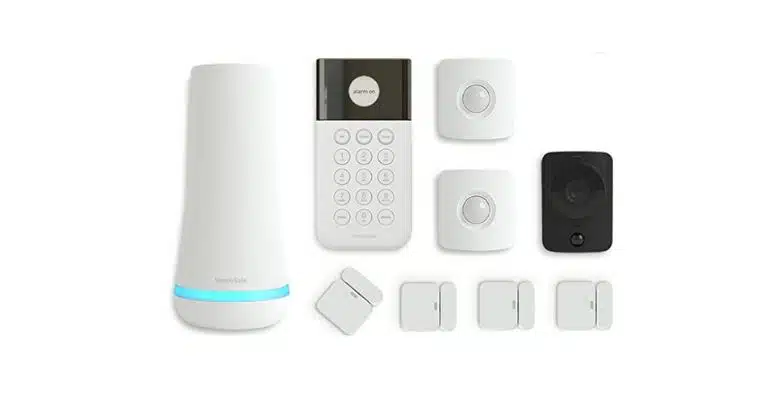
- Gen 3 SimpliSafe (January 2018-present) – black and white keypad with round buttons. Wi-Fi and cellular, app control, Alexa/Google Assistant compatible, video verification, over 15 sensor types. This is everything SimpliSafe sells today, and the only generation the app and smart home integrations support.
SimpliSafe launched Gen 3 on January 10, 2018, as a full redesign built with design firm IDEO – smaller sensors, longer range, encrypted communication, and the app and cloud features the Original system never had. You’ll sometimes see people online refer to an intermediate “SS2” or “Gen 2” system in forum posts, but that’s not a designation SimpliSafe itself uses – its current support documentation describes only Original and Gen 3. If you bought before 2018, you have Original. If you bought after, you have Gen 3. There’s no in-between to sort out.
Generation Comparison
| Generation | Years sold | Cross-compatible with | Current status |
|---|---|---|---|
| Original SimpliSafe | Pre-2018 | Nothing from Gen 3 | Discontinued – no components sold, still functional if installed |
| Gen 3 SimpliSafe | 2018-present | Nothing from Original | Current – only generation SimpliSafe actively sells and supports |
| SimpliCam / Video Doorbell Pro | Sold alongside both | Both generations | The one hardware exception – carries over automatically |
What’s Cross-Compatible vs What Isn’t
SimpliSafe is direct about this in its own support documentation:
“The sensors from your Original SimpliSafe system are not compatible with the new Gen 3 system.”
Here’s the full breakdown:
| Component | Cross-compatible? |
|---|---|
| Entry sensors | No |
| Motion sensors | No |
| Keypads | No |
| Base station | No |
| Key fob | No |
| SimpliCam wired indoor camera | Yes – transfers automatically |
| Video Doorbell Pro | Yes – transfers automatically |
| Account / monitoring plan | Yes – carries over via app |
The reason has nothing to do with SimpliSafe locking you into new hardware for its own sake. Original SimpliSafe sensors send unencrypted signals. Gen 3 switched to encrypted communication for security and range – a different protocol that the old sensors physically can’t speak. That’s not something a firmware update can patch.
Upgrading to New SimpliSafe – What to Keep and What to Replace
If you’re moving from Original to Gen 3, plan to replace the base station, keypad, all sensors, and key fobs. What you don’t have to replace:
- SimpliCam wired indoor cameras carry over and link automatically when you set up the new base station via the app
- Video Doorbell Pro also transfers
- Your monitoring plan and account settings transfer when you use the “Replace Base Station” option in the SimpliSafe app
For most households upgrading from Original, the practical path is buying a Gen 3 package that covers your main entry points, then adding individual sensors for doors and windows you want covered. SimpliSafe sells add-on sensors individually, so you’re not locked into a bundle size that doesn’t fit your home.
Once your Gen 3 system is running, the smart home side opens up too – Alexa and Google Assistant both connect to Gen 3 for arming and status checks, something the Original system never supported at all. See our SimpliSafe and Google Home setup guide for exactly what that integration does and doesn’t do.
The current Gen 3 system is a solid starting point for a full replacement:


How to Check Which Generation You Have
Look at your keypad
All-white with oval buttons and one red + one blue button = Original SimpliSafe. Black and white with round buttons = Gen 3.
Check the base station
The Original base station is a short, squat cylinder. The Gen 3 base station is taller and slimmer – about 8 inches tall with a flat top.
Open the SimpliSafe app
If you can control your system through the SimpliSafe app, you have Gen 3. The Original system has no app control – you manage it through the keypad only.
Check your purchase date
If you bought your system before January 2018, it’s almost certainly Original. Gen 3 launched in January 2018 and is the only version SimpliSafe has sold since.
Does SimpliSafe Still Support the Original System?
SimpliSafe no longer sells Original sensors, keypads, or base stations – if a component fails, there’s no replacement part coming from SimpliSafe directly. Monitoring is still available for Original systems still in service, but you’re on hardware SimpliSafe stopped manufacturing years ago. Any failed sensor means either living without that entry point covered or replacing the whole system.
Practically, that makes Original SimpliSafe a system you maintain, not one you grow. If you want to add a room, add a camera, or bring the system into a smart home setup, Gen 3 is the only path forward.
Is It Worth Upgrading?
If your Original system is still arming, disarming, and tripping the siren when it should, there’s no functional reason to replace it today. It won’t talk to Alexa or Google Assistant, and you can’t check it from your phone, but the core job – loud noise when a sensor trips – still works.
The upgrade makes sense once one of three things happens: a sensor or the base station fails and there’s no replacement part to buy, you want app control or remote monitoring you don’t currently have, or you’re building out a broader smart home and want your alarm system talking to the rest of it. Absent one of those, an aging Original system that still works is not a system you need to touch.