

This post contains affiliate links. If you buy through them, DumbSwitches may earn a commission at no extra cost to you. See our full disclosure.
The short answer: Arlo Pro 5S 2K if you want the best wire-free camera money can buy, and Blink Outdoor 4 if you want something that works without emptying your wallet every month. Everything else falls somewhere between those two.

Outdoor security cameras have one problem nobody talks about enough: the sticker price is a lie. Most of these cameras run on subscriptions that cost more than the hardware over a two- or three-year window. This guide tells you exactly what each camera costs to own, not just to buy.
Five of the six picks below are wire-free, so you can mount them where the coverage actually needs to be. The sixth is wired, because floodlight cameras always are. If you already know you want battery power, skip to the Arlo, Blink, Nest or Eufy entries – those are the wireless ones.
Quick comparison
- Best overall: Arlo Pro 5S 2K – 2K HDR, color night vision, HomeKit, wire-free, local storage option
- Best mid-range: Ring Spotlight Cam Plus – built-in spotlight, wired or battery, Alexa ecosystem
- Best budget and best battery life: Blink Outdoor 4 – up to 2-year AA battery life, local storage, no subscription required for basics
- Best for Google Home: Google Nest Cam (battery) – solid AI detection, free familiar face alerts, tight Google integration
- Best subscription-free: Eufy SoloCam E340 – local storage only, no monthly fees, dual-lens for porch coverage
- Best wired floodlight: Wyze Cam Floodlight v2 – 2K, 2800 lumens, $100 flat
Arlo Pro 5S 2K – Best Overall
The Arlo Pro 5S 2K (model VMC4060P) is the best wire-free outdoor camera you can buy right now. 2K HDR video, color night vision that actually works in near-darkness, 160-degree field of view, wire-free magnetic mount. It covers a lot of ground without requiring a PhD in bracket alignment.
Battery life is the part reviews tend to fudge. Arlo claims up to six months, and that holds in a low-traffic spot like a side yard. Point it at a driveway with a school run going past and you are recharging every two to three months. The magnetic charging cable makes the top-up quick, but plan on doing it.
The catch is Arlo’s subscription. Without an Arlo Secure plan ($2.99/mo per camera or $12.99/mo for unlimited), you get 30 seconds of cloud clips, no AI detection, and no package detection. With the plan, you get everything – activity zones, package detection, e911 emergency response, extended clip length. For most people, the Unlimited plan at $12.99 is the only one that makes sense if you have more than one camera.
HomeKit support requires an Arlo SmartHub (sold separately). If Apple Home is your ecosystem, budget for the hub. Local storage via microSD in the hub is available too – the one legitimate path to cloud-optional usage if you’re willing to manage it yourself.
For a deeper look at the full Arlo lineup, see our Best Arlo Cameras guide.
- Resolution: 2K HDR (2560 x 1440)
- Power: rechargeable battery (wire-free)
- Battery life: up to 6 months claimed, 2-3 months in high-traffic placements
- Night vision: color
- Field of view: 160 degrees
- Weather rating: IP55
- Smart home: Alexa, Google Home, HomeKit (with SmartHub)
- Subscription: required for AI features and full clip history
Ring Spotlight Cam Plus – Best Mid-Range

The Ring Spotlight Cam Plus sits between the entry-level Stick Up Cam and the pro-tier Spotlight Cam Pro. You get a built-in spotlight that actually lights the whole scene, 1080p HDR, two-way talk, and a built-in siren. Available in both battery and wired versions – the battery version gives you flexibility on placement, the wired keeps you from ever swapping batteries.
The spotlight is worth calling out on its own. It is a 375-lumen panel paired with a loud siren, and both fire on motion. That combination turns an opportunistic person around in a way a camera alone does not – deterrence is a different job from recording, and most cameras at this price only do the second one. The battery version runs roughly six months per charge.
Ring’s subscription story: without a Ring Protect plan ($4.99/mo per camera or $10/mo for your whole home), you get live view only – no recorded video, no event history, no motion notifications with clips. It’s a hard paywall. The Basic plan per camera is fine if you have one or two cameras. The Plus plan at $10/mo is the better deal once you have three or more Ring devices.
If you’re already in the Alexa ecosystem, Ring integrates cleanly. If you’re in Apple Home, it’s worth knowing Ring added HomeKit support, though it’s not as polished as Arlo’s implementation. Google Home integration is limited.
- Resolution: 1080p HDR
- Power: battery or wired (plugin)
- Battery life: roughly 6 months per charge
- Night vision: color (spotlight-assisted)
- Spotlight: 375 lumens, plus siren
- Field of view: 140 degrees
- Weather rating: IP55
- Smart home: Alexa, HomeKit
- Subscription: required for any recorded video
Blink Outdoor 4 – Best Budget Pick and Best Battery Life

The Blink Outdoor 4 is the camera you recommend to someone who doesn’t want to think about it too much. Around $100, wire-free, AA batteries, 1080p HD, two-way talk. It works.
Two AA lithium cells are the whole argument. Blink claims two years; in practice you get one to two depending on how busy the coverage zone is. Either way there is no charging cable, no recharge cycle, and no ladder trip every few months. If the mounting spot is awkward – second storey, over a garage, on a pole – this is the only camera on the list that does not eventually punish you for choosing it.
What separates it from the previous generation: motion detection is faster and more accurate, night vision is improved, and local storage via USB drive in the Sync Module is now genuinely usable. Add a Sync Module 2 ($35, one time) and a USB drive and you can skip the Blink subscription entirely. That’s a meaningful differentiator from Ring and Arlo, where local storage is either unavailable or locked to a paid tier.
The free cloud tier on Blink gives you 60-day event video storage for a limited time post-purchase, then shifts you to Blink Subscription ($3/mo per camera or $10/mo for unlimited). The subscription adds extended cloud storage and person detection. But the local storage option means you can avoid it entirely – which is genuinely rare at this price point.
For more detail on how Blink storage works, see our Blink Outdoor Camera Review.
- Resolution: 1080p HD
- Power: 2x AA lithium batteries (wire-free)
- Battery life: 1-2 years, no recharging
- Night vision: infrared (no color)
- Field of view: 143 degrees
- Weather rating: IP67
- Smart home: Alexa
- Subscription: optional if using local storage via Sync Module 2
Google Nest Cam (Battery) – Best for Google Home

The Google Nest Cam (battery) is for people already running Google Home. It’s the camera that makes the most sense inside that ecosystem because the integration is clean in a way third-party cameras never quite manage. It works with Google Home, Google Assistant and Nest Hub displays with no workarounds.
The AI detection is genuinely good – it distinguishes between people, animals, vehicles, and packages accurately, with fewer false alerts than most competitors at this price. Familiar face detection works on the free tier. Tag the people who live there and the notification tells you whether it’s your neighbor or a stranger before you open it. Every other camera here charges for that or does not do it at all.
The camera records locally to an onboard 1GB flash buffer, which captures a few hours of footage even without an internet connection or subscription. That’s a practical feature for internet outages and power blips. It also runs either wire-free on the battery or hardwired over USB-C, so the same camera can go on a fence post now and a porch outlet later.
Google Nest Aware starts at $8/mo for 30 days of event video. Without it, you get 3 hours of event video storage. The free tier is more usable than Ring’s, but still limited. For 60 days of history plus 24/7 recording on multiple cameras, Nest Aware Plus runs $15/mo.
- Resolution: 1080p HDR
- Power: rechargeable battery or USB-C wired
- Battery life: roughly 6 months per charge
- Night vision: infrared (color in lighted conditions)
- Field of view: 130 degrees
- Weather rating: IP54
- Smart home: Google Home, Alexa (limited)
- Subscription: 3 hours free, familiar face detection free; Nest Aware from $8/mo for full feature set
Eufy SoloCam E340 – Best Subscription-Free Option

If you refuse to pay a monthly fee, the Eufy SoloCam E340 is your camera. It stores everything locally on 8GB of onboard storage – no cloud, no subscription, no monthly bill, no hub required.
The dual-lens setup is the practical differentiator: a 3K main camera for the scene and a second lens with 8x zoom for tighter face detail. Better than a single-lens setup for identifying people who aren’t standing directly in front of your door. Eufy’s AI runs locally on the device, so detection is fast and doesn’t require a cloud round-trip.
Add the solar panel accessory and the running cost goes to genuinely zero. In most US climates the panel keeps the battery topped up year-round, so there is no recharging and no subscription and no third-party service to depend on. For a vacation house, a rental, or a shed at the back of a property you visit twice a year, that combination is hard to beat.
The tradeoff is smart home integration – Eufy’s ecosystem is self-contained and third-party integrations are limited. If HomeKit, Google Home, or deep Alexa integration is important to you, Eufy isn’t the right choice. If you want the best standalone subscription-free camera, it is.
Eufy’s doorbell lineup follows the same local storage philosophy – see our Best Eufy Doorbell guide if you want to pair this with a matching doorbell.
- Resolution: 3K main lens + 8x zoom telephoto
- Power: rechargeable battery, optional solar panel
- Storage: 8GB onboard, local only
- Night vision: color (spotlight-assisted)
- Field of view: 135 degrees
- Weather rating: IP67
- Smart home: Alexa, Google Home (basic)
- Subscription: none required – all storage is local
Wyze Cam Floodlight v2 – Best Wired Floodlight

The Wyze Cam Floodlight v2 is the cheapest way to get a proper floodlight camera. $100. 2K resolution, 2800-lumen dual LED panels, 160-degree field of view, color night vision once the lights kick on. It requires a wired installation – you’re replacing an existing outdoor light fixture or running new wire, so factor that in.
Wyze’s Cam Plus subscription ($1.99/mo per camera or $5.99/mo unlimited) adds AI detection and removes the 12-second clip limit. Without it, you get event clips but with restrictions. Local microSD recording is available on all tiers and is arguably the best reason to buy Wyze – a 64GB card gives you days of continuous local footage that doesn’t depend on the cloud at all.
The caveats are real: Wyze had a serious privacy incident in early 2024 where roughly 13,000 users briefly saw footage from other people’s cameras after an AWS outage. They fixed it, but it’s worth knowing before you put this camera pointed at your back door. See our full Wyze Cam v4 Review for more on the trust question.
For more wired and battery floodlight options beyond Wyze, see The Best Smart Outdoor Floodlights.
- Resolution: 2K (2560 x 1440)
- Power: wired (requires hardwired outdoor electrical)
- Night vision: color (floodlight-assisted)
- Field of view: 160 degrees
- Weather rating: IP65
- Smart home: Alexa, Google Home
- Subscription: optional, but free tier is limited
What actually matters when buying an outdoor camera
Resolution
1080p is fine for most residential use cases. 2K starts to matter when you need to identify faces or read license plates from 15+ feet away. 4K is mostly overkill unless you have a very wide property or unusually specific forensic needs. Don’t let resolution marketing drive your decision – placement and field of view matter more. Higher resolution also eats local storage faster, which matters if you are recording to an SD card or a Sync Module.
Wire-free vs. wired
Wire-free is easier to install and place where you actually need it. The tradeoffs are battery management and usually lower continuous recording capability. Wired cameras give you always-on power and often better recording quality, but placement is constrained by where you can run wire. Floodlight cameras are always wired.
Inside wire-free there is a second decision most guides skip: battery type. Rechargeable packs (Arlo, Ring, Nest) are convenient right up until the camera dies and you have a blind spot until you notice. AA lithium cells (Blink) run one to two years unattended. If the camera is going somewhere you would need a ladder to reach, AA wins on that fact alone.
Subscription costs
This is the number most buying guides bury. Here’s the honest breakdown for 3 years of ownership, subscription included:
- Arlo Pro 5S 2K: ~$250 camera + $468 subscription (Unlimited at $12.99/mo x 36) = $718 total
- Ring Spotlight Cam Plus: ~$200 camera + $360 subscription (Home at $10/mo x 36) = $560 total
- Blink Outdoor 4: ~$100 camera + $35 Sync Module 2 + $0 subscription (local storage) = $135 total
- Google Nest Cam (battery): ~$180 camera + $576 subscription (Aware Plus at $15/mo x 36) = $756 total – or $288 with basic Aware plan
- Eufy SoloCam E340: ~$150 camera + $0 subscription = $150 total
- Wyze Cam Floodlight v2: ~$100 camera + $216 subscription (Plus at $5.99/mo x 36) = $316 – or $72 at per-camera rate
The subscription-free cameras (Blink with local storage, Eufy) look very different over a multi-year window than their sticker price suggests. Eufy at $150 for three years costs less than five months of Arlo Unlimited.
Local storage vs. cloud
Local storage kills the monthly fee, and it has one failure mode worth naming: the footage lives at the camera. If someone takes the camera off the wall, the evidence of them doing it leaves with it. Cloud storage survives that, and costs you every month forever. A camera that does both – free local recording plus a limited free cloud tier, which is where Blink and Nest land – is the sensible middle for most houses.
Weather rating
IP55 is the minimum for outdoor cameras – it handles rain and dust. IP67 (Blink, Eufy) means the camera can take full submersion briefly, which is overkill for most outdoor placements but a signal of better build quality. IP65 (Wyze Floodlight) adds stronger water jet resistance. For most eaves and wall-mounted placements, IP55 is fine.
Smart home ecosystem
Match the camera to your ecosystem. Alexa household: any of these work. Google Home household: Nest Cam is the obvious pick, though Wyze and Ring work too. Apple Home: Arlo Pro 5S with SmartHub is the only wire-free outdoor camera with genuine HomeKit support – though that support does not include HomeKit Secure Video, so recordings still route through Arlo’s own cloud subscription, not encrypted iCloud storage. See our guide to which cameras actually get HomeKit Secure Video before assuming HomeKit compatibility means iCloud-stored clips. Eufy is improving its HomeKit integration but it’s not there yet. The gap between “works with” on the box and actually being wired into your routines is bigger than the spec sheet suggests.
How to install an outdoor smart camera
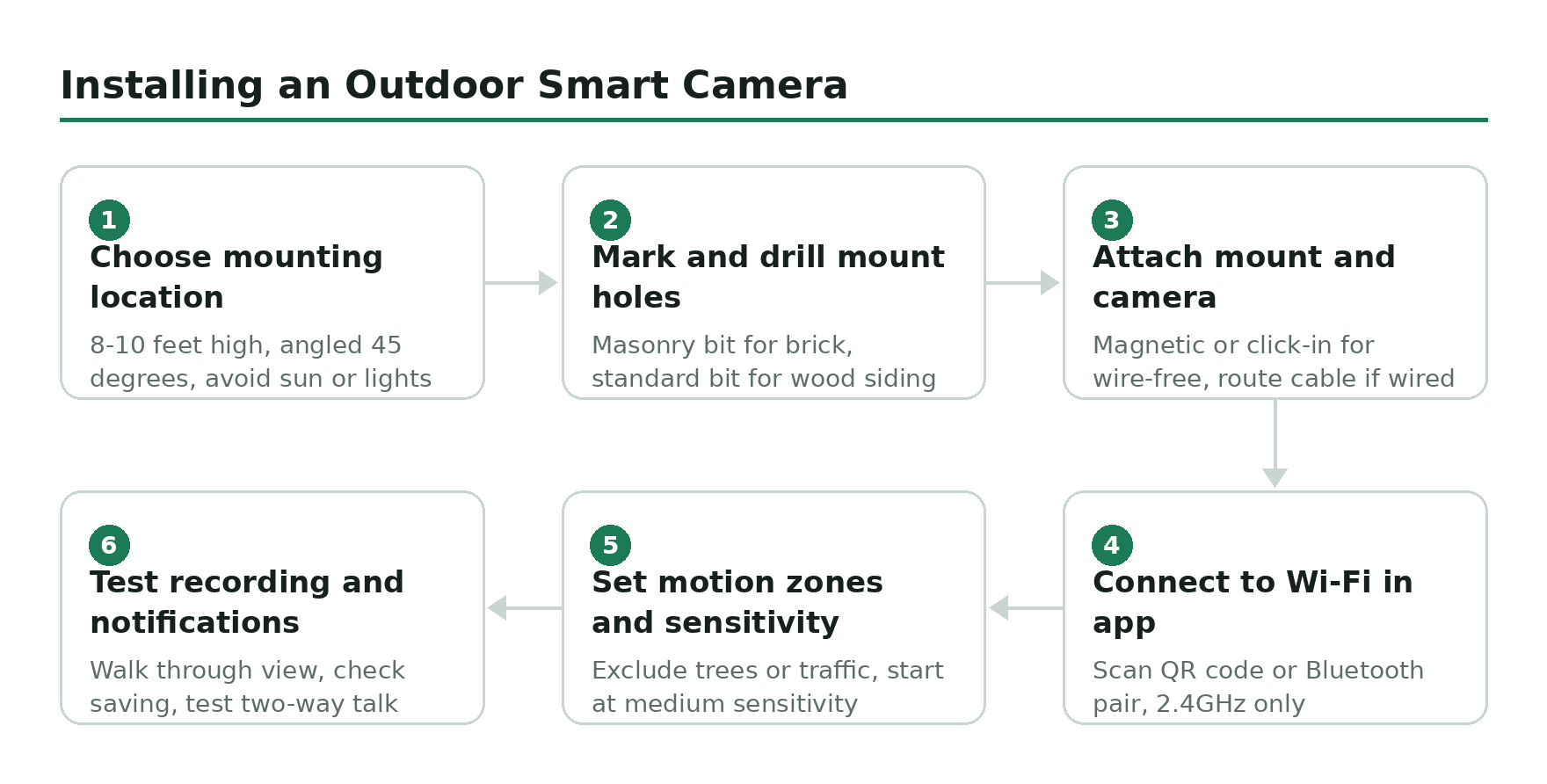
- Choose your mounting location – Pick a spot 8-10 feet off the ground, angled down at roughly 45 degrees. Avoid pointing directly into the sun or at strong light sources. Identify where you want motion detection to trigger – usually the approach path, not a public sidewalk.
- Mark and drill mount holes – Hold the mounting bracket against the wall and mark the screw holes with a pencil. For masonry or brick, use a masonry drill bit. For wood siding or eaves, standard drill bits work fine. Most cameras include anchors for masonry mounting.
- Attach the mount and camera – Screw the bracket into the wall using the provided hardware. Attach the camera to the mount – most wire-free cameras use a magnetic or click-in system. Wired cameras will require routing the cable through the wall or using conduit.
- Connect to Wi-Fi in the app – Download the manufacturer’s app (Arlo, Ring, Blink, Google Home, Eufy Security, or Wyze), create an account, and follow the in-app setup flow. Most cameras connect via QR code scan or Bluetooth pairing. Have your 2.4GHz Wi-Fi password ready – most cameras don’t support 5GHz.
- Set motion zones and sensitivity – Open the camera settings in the app and define motion detection zones. Exclude areas with constant movement (trees blowing, passing traffic) to reduce false alerts. Adjust sensitivity to match your environment – start at medium and dial up or down based on actual performance.
- Test recording and notifications – Walk through the camera’s field of view to verify motion triggers correctly. Check that recordings are saving as expected – to cloud, local storage, or both. Test two-way talk if your camera has it. Adjust the camera angle if coverage gaps are visible in the live view.