
This post contains affiliate links. If you buy through them, DumbSwitches may earn a commission at no extra cost to you. See our full disclosure.
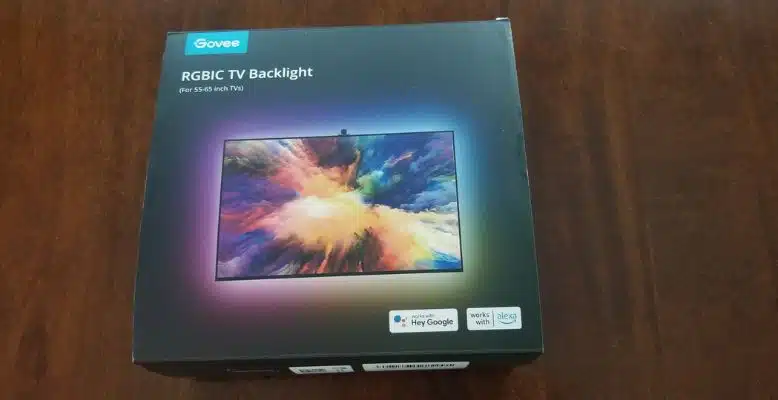
The Govee Envisual TV Backlight T2 (H605C) does what it promises: stick LED strips behind your TV, point two cameras at the screen, and your wall lights up in whatever colors are on screen. At $50-70 for the 55-65″ kit on a discount (list is ~$130), it’s a reasonable buy if you watch a lot of movies in a dark room and want the effect without spending $200+ on a Philips Hue setup. It’s not perfect. But it earns its spot.

Quick verdict
- Color sync works well in dark rooms – genuinely immersive for movies
- Dual cameras (T2 upgrade from T1) improve edge and corner accuracy
- Alexa and Google Assistant work; HomeKit does not – no Matter support
- Video sync lag is real (~200-300ms) – noticeable on fast cuts
- Calibration is fiddly and the instructions are not great
- 2.4 GHz only – no 5 GHz
Govee Immersion vs. Dreamview vs. Envisual – what’s what
Govee has done a heroic job of confusing everyone with their naming. Here’s the short version: Immersion RGBIC was the first camera-based sync product. Dreamview was the marketing umbrella name. Envisual is the current product line – and the T2 (H605C) is the current generation, replacing the T1 (H6199).
The T2 upgrade that actually matters: dual cameras instead of one. Two cameras give better color read across the full screen, especially at the edges and corners where single-camera setups tend to go wrong. The T1 also mounted at the bottom of the TV; the T2 counterweight system mounts at the top only (not compatible with bottom placement). If you have a TV stand that blocks the top, check before you buy.
What’s in the box
- LED strip lights (RGBIC, doubles the bead count vs. T1)
- Control box
- Dual cameras with mounting hardware
- Power adapter
- Orange calibration foam system (improved from loose foam blocks in T1)
- Alcohol cleaning pads
- Adhesive tape
- User manual (not its strongest feature)
TV size compatibility
Two kit sizes: 55-65″ (B0BCQ9YQYW) and 75-85″ (B0BCQBVSDT). Not compatible with curved TVs. Works with LED, OLED, and LCD flat screens.
How to set it up
Budget about 30 minutes – 15 for physical installation, another 15 for app pairing and calibration. The calibration in particular takes patience. Don’t rush the orange foam placement – it’s the step people mess up.
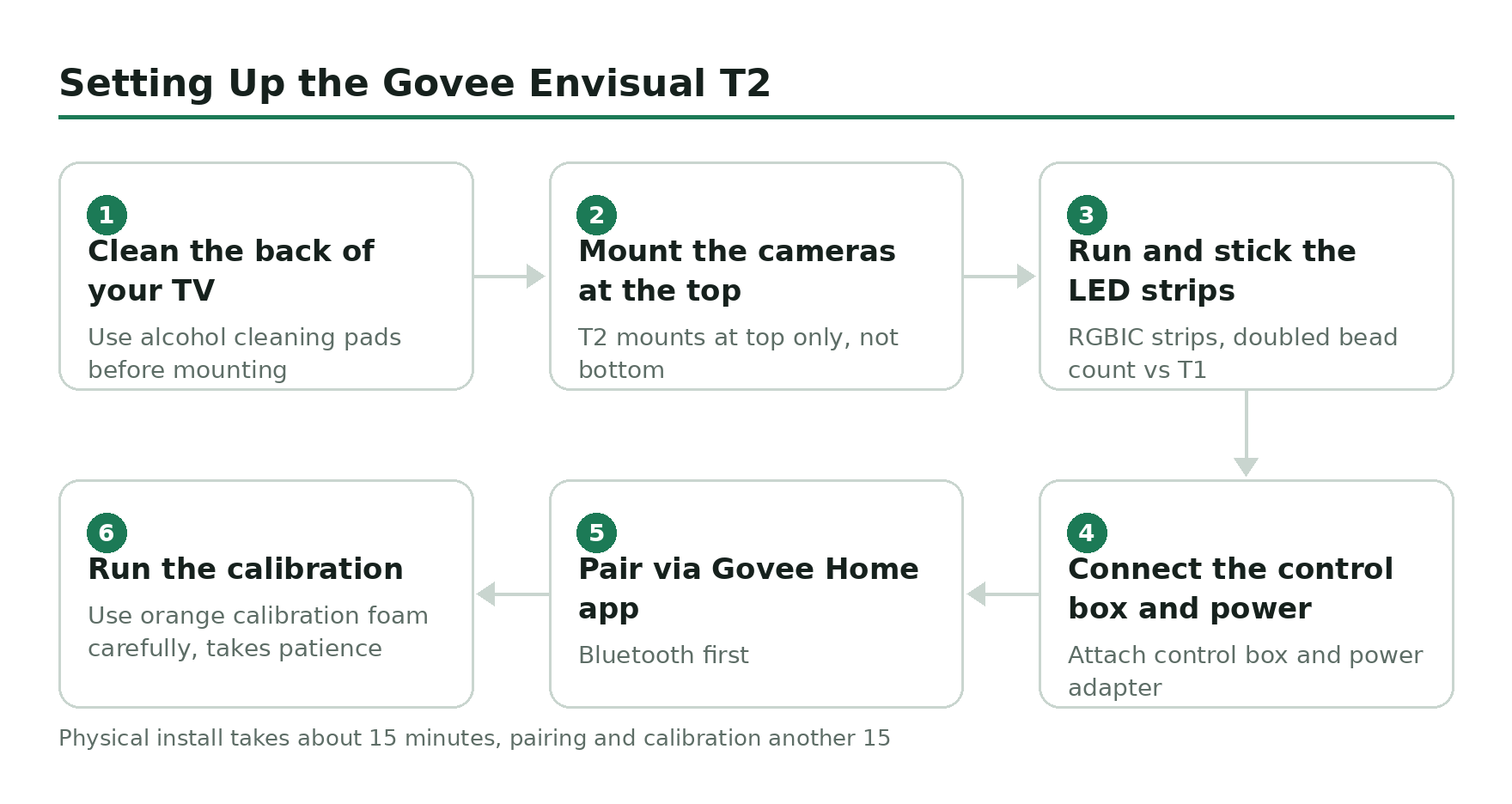
Clean the back of your TV
Use the included alcohol pads to wipe down the TV back surface where the strips will mount. Adhesion fails fast on a dusty surface, especially in warm rooms.
Mount the cameras at the top
The T2 counterweight system mounts at the top of the TV only. Position both cameras to face the screen, roughly symmetrical. The dual-camera setup handles edge color better than older single-camera models.
Run and stick the LED strips
Route the strips around the perimeter of the TV back. Press firmly along every inch – the adhesive needs full contact. Corners are the weak point; press those especially hard.
Connect the control box and power
Plug the strips into the control box, connect the cameras, then plug into power. The control box is the hub for everything.
Pair via Govee Home app (Bluetooth first)
Download the Govee Home app. Initial pairing uses Bluetooth – 2.4 GHz Wi-Fi takes over after that. Make sure you are on a 2.4 GHz network; 5 GHz will not work.
Run the calibration
The app walks you through placing the orange foam markers on your screen and mapping them through the camera view. Take your time here. Rushing calibration is why people end up with blown-out reds on one side. Full guide at the calibration walkthrough.
Full installation walkthrough: Govee Immersion setup guide.
Performance: the honest take
In a dark room watching a movie with wide color range – landscapes, space scenes, anything with a strong dominant color – this thing looks genuinely good. The wall behind you shifts color in real time and your peripheral vision picks it up. It extends the image in a way that a blank wall doesn’t.
Fast cuts are where you notice the lag. There’s a ~200-300ms delay between what’s on screen and what the lights do. On a slow drama or nature documentary, you’ll never notice. On an action movie with rapid editing, you will. It’s not a deal-breaker, but don’t expect frame-perfect sync.
Edge color accuracy is improved over the T1 – the dual cameras handle corners better – but it’s still not perfect. Some users report that one side pulls too warm or too cool even after correct calibration. If you get that, redo the calibration from scratch before blaming the hardware.
The 7 scene preset modes (static colors, gradients, etc.) look fine and are easy to cycle through in the app. Music sync mode is fun for a few minutes. The DreamView feature lets it sync with other non-camera Govee lights via Bluetooth, which is a nice bonus if you already have Govee gear.
Smart home compatibility
Alexa works. Google Assistant works. HomeKit does not. The T2 is not Matter-compatible, so if your setup is Apple-centric, this is a hard no. Check the full breakdown: does Govee work with HomeKit?
Wi-Fi is 2.4 GHz only. If your router has a combined 2.4/5 GHz network with the same SSID, you may have trouble during setup – separate them if pairing fails.
Where it falls short
- No HomeKit / Matter – not even close to being on the roadmap from what Govee has signaled
- Adhesion degrades in warm rooms – the strips start peeling from the TV back over time in hot environments; press them hard during install and check after a few weeks
- Calibration is a genuine pain – the visual thinker framing in the instructions is polite; it’s just awkward and requires patience
- 2.4 GHz only – not a huge deal, but worth knowing
- Video sync lag – real at ~200-300ms; doesn’t kill the effect but it’s there
- Lights don’t auto-off with the TV – you have to close them via the app or set a schedule; minor annoyance that adds up
The verdict
If you want ambient TV backlighting and your budget is $50-130, the Govee Envisual T2 is what you buy. Nothing at this price point does camera-based sync better. The dual-camera T2 is a meaningful upgrade over the T1. The lag is real but not ruinous. The HomeKit gap is a dealbreaker if that’s your ecosystem, but for Alexa or Google households it’s a non-issue.
Buy the right size kit: 55-65″ here or 75-85″ here.
Related guides
- Govee Immersion setup guide
- Govee Immersion calibration walkthrough
- Govee Immersion installation instructions
- Does Govee work with HomeKit?
Govee Dreamview TV Backlight
Honest review of the Govee Envisual TV Backlight T2 (H605C). Camera sync, lag, HomeKit limits, calibration, and whether it is worth buying in 2026.
Product Brand: Govee
Product In-Stock: InStock
4.5