
Yes, Sengled bulbs work with Apple HomeKit – but how they do it depends entirely on which Sengled product you buy. The old Zigbee bulbs need the Sengled Hub (model E39-G8C) as a bridge. The newer Matter-enabled bulbs connect directly to Apple Home over Wi-Fi, no Sengled hub required. In 2026, the Matter route is the one worth taking.
What You Need for Sengled + HomeKit
There are two separate paths here, and they work very differently.
Path 1: Sengled Zigbee Bulbs (Hub Required)
Sengled’s original smart bulb lineup runs on Zigbee. These bulbs cannot talk to HomeKit on their own – they need the Sengled Hub E39-G8C, which is the only Sengled hub with HomeKit support built in. That hub acts as a bridge: the bulbs connect to it over Zigbee, and the hub exposes them to the Apple Home app.
The E39-G8C has been phased out of most major retailers. Best Buy no longer stocks it. You can still find it on Amazon and secondary marketplaces, but stock is thin. If you’re building a new setup, this is not the route to start with.
Path 2: Sengled Matter Bulbs (No Sengled Hub Needed)
Sengled’s Matter-certified bulbs connect directly to Apple Home over 2.4GHz Wi-Fi. You don’t need the Sengled hub. You do need a Matter controller already on your network – an Apple HomePod mini, Apple TV 4K (3rd gen or later), or iPad set up as a home hub all qualify. If you already use Apple HomeKit for anything else, you almost certainly have one.
This is the current Sengled path worth buying into.
Which Sengled Bulbs Work with HomeKit
The Matter lineup is what matters in 2026. These are the active products:
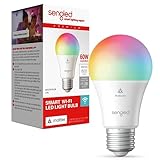
- Sengled Matter Multicolor A19 (B0C6QY1DRW) – Standard E26 base, 60W equivalent, 800 lumens, full color + tunable white. Check price on Amazon.
- Sengled Matter Multicolor G2 (B0D46DTK3K) – Updated second-gen version with the same specs and instant pairing. Check price on Amazon.
- Sengled Zigbee Bulbs (BR30, A19, ST19) – Still sold, still work with HomeKit via the E39-G8C hub. Fine if you already have the hub. Not worth buying into fresh.
If you’re starting from scratch, buy the Matter A19 or G2. They’re straightforward, no additional hardware required beyond what you already own.
How to Set Up Sengled Matter Bulbs with HomeKit
Confirm your Matter controller is online
You need an Apple HomePod mini, Apple TV 4K (3rd gen+), or an iPad acting as a home hub. Open the Home app on your iPhone and check Settings – your home hub should show as Connected.
Screw in the Sengled Matter bulb and power it on
The bulb will flash when it enters pairing mode. If it doesn’t flash, turn it off and on three times to reset it.
Open the Apple Home app and tap the + button
Select Add Accessory, then scan the Matter QR code on the bulb’s packaging (or on the bulb itself). The Home app handles the rest.
Name the bulb and assign it to a room
Pick a name you’ll actually say out loud – ‘Office Light’ works, ‘Sengled A19 Color Bulb 1’ does not. Assign it to the correct room so scenes and automations work as expected.
Test with Siri
Try ‘Hey Siri, turn on [bulb name]’ to confirm the pairing is working. Then set up any automations or scenes you want in the Home app.
Limitations Worth Knowing
- 2.4GHz only. Sengled Matter bulbs don’t support 5GHz Wi-Fi. If your router broadcasts a combined 2.4/5GHz network under one SSID, most phones and bulbs will negotiate correctly – but if you have connection issues, split your bands and connect on 2.4GHz explicitly.
- Color accuracy isn’t Philips Hue. The Matter multicolor bulbs cover a solid range, but for serious color work or circadian lighting setups, Hue or LIFX will outperform them. For most living rooms and bedrooms, Sengled is fine.
- Zigbee bulbs need the old hub. If you buy the Zigbee line instead of Matter (easy to do – check the listing carefully), you’ll need the E39-G8C hub for HomeKit, and sourcing that hub is increasingly painful. Stick to Matter.
- No Thread support. Sengled Matter bulbs use Wi-Fi, not Thread. That’s not a problem, but don’t expect them to act as Thread border routers or benefit from mesh Thread networks.