

This post contains affiliate links. If you buy through them, DumbSwitches may earn a commission at no extra cost to you. See our full disclosure.
Ring Alarm 2 is the most popular DIY home security system in the US. It’s affordable, easy to set up, and plays nicely with the rest of the Amazon ecosystem. It also has a subscription model baked into almost every useful feature – which is fine as long as you know that going in.
This is an honest look at where Ring Alarm 2 stands in 2026, who it’s actually good for, and where it falls short.

What’s in the Box
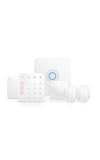
The standard 8-piece kit includes a base station, keypad, contact sensor, motion detector, and range extender, plus a Ring Alarm yard sign and sticker pack. That covers one entry point and one room – enough to prove the concept, not enough to cover a real house.
You’ll need to buy expansion pieces separately. Contact sensors are around $20 each, motion detectors around $35. A three-bedroom house with a garage realistically needs $150-200 in add-ons beyond the base kit.
The base station is the hub. It runs on Z-Wave for all Ring sensors, which means the sensors don’t depend on your Wi-Fi – they communicate directly with the base station on a separate frequency. That’s a meaningful reliability advantage over pure Wi-Fi systems.
Buy the 8-piece kit here: Ring Alarm 8-Piece Kit on Amazon
Ring Subscription Tiers in 2026
Ring rebranded its subscription tiers in January 2026. The old Basic/Plus/Pro names are gone. Here’s what you’re looking at now:
- Solo ($10/mo): 24/7 professional monitoring for one location. Includes cellular backup, fire and carbon monoxide monitoring, and unlimited Ring camera video history.
- Multi ($20/mo): Same as Solo but covers multiple locations under one plan. If you have a house and a cabin, this is the one.
- AI Pro (pricing varies): Adds AI-powered camera features, smart alerts, and more granular motion detection. Aimed at camera-heavy setups.
Professional monitoring is month-to-month with no contract. You can cancel any time. That’s a genuine differentiator – most traditional monitoring companies lock you into a 1-3 year contract.
Does Ring Alarm Work Without a Subscription?
Yes, with serious caveats. Without a plan, Ring Alarm will still arm/disarm, trigger the siren, and send push notifications to your phone when sensors trip. The app works. Alexa integration works.
What you don’t get: no professional monitoring (obviously), no cellular backup if your internet goes down, and Ring camera video history is limited to a live view only. If someone cuts your internet line before breaking in, the system is relying entirely on your phone’s cellular data to alert you.
For a rental property or vacation home where you want basic awareness without paying monthly, sub-free Ring Alarm is actually usable. For a primary residence, $10/month for Solo monitoring is hard to argue with.
Alexa and Amazon Integration
Ring is owned by Amazon, so the Alexa integration is as deep as it gets. You can arm and disarm via voice (with a PIN), get status reports, and set up routines – like turning on all your smart lights when the alarm triggers.
If you’re already in the Amazon ecosystem with Echo devices and Ring cameras, it’s a tight loop. Everything talks to everything without fiddling with third-party integrations.
Z-Wave and Third-Party Sensors
Ring Alarm 2 uses Z-Wave, which is a widely-used smart home protocol. Technically Z-Wave supports third-party sensors, but Ring has locked the base station to only work with Ring-branded accessories. You can’t pair a non-Ring Z-Wave sensor to the Ring Alarm hub.
This is a deliberate ecosystem lock. The Z-Wave protocol is open – Ring just chose not to be. If sensor flexibility matters to you, that’s a real limitation.
What You Don’t Get: No HomeKit Support
Ring Alarm has no native Apple HomeKit support. There’s no official path to get Ring Alarm sensors into the Home app, and Ring hasn’t shown any interest in changing that.
If you’re deep in the Apple ecosystem – HomePod, iPhone, Apple TV as a home hub – Ring is the wrong choice. Look at SimpliSafe, which has worked on HomeKit integration, or Aqara, which is native HomeKit.
Ring Alarm 2 vs. SimpliSafe
These two go head-to-head constantly, and it mostly comes down to ecosystem loyalty.
- Price: Ring kits are generally cheaper upfront. SimpliSafe hardware costs more but monitoring is in the same ballpark ($10-20/mo).
- Ecosystem: Ring wins hard if you use Amazon/Alexa. SimpliSafe is more neutral and plays better with Google Home and Apple platforms.
- Cellular backup: Both have it on paid plans. SimpliSafe includes it on their entry monitoring tier; Ring requires Solo ($10/mo) for the same.
- Contract: Both are month-to-month. No long-term commitment on either side.
- Camera integration: Ring wins here too. Ring cameras are first-class in the Ring Alarm app. SimpliSafe cameras work but feel bolted on.
If you already have Ring Doorbells or Ring cameras, Ring Alarm is the natural choice. If you’re starting fresh with no existing ecosystem, SimpliSafe gives you more flexibility. Read the full breakdown in our SimpliSafe vs Ring Alarm comparison.
Ring Alarm Pro: Worth the Upgrade?
The Ring Alarm Pro is a step up from the standard kit – it has a built-in Eero Wi-Fi router in the base station. This means your security system has its own internet connection, separate from your main router. If your household router goes down, the alarm keeps working.
It also ships with a 30-day free trial of Ring’s Alarm Pro Plan, which includes 24/7 backup internet. For households that want the cleanest possible setup and don’t want to think about router vulnerabilities, it’s worth considering.
Ring Alarm Pro kit: Ring Alarm Pro 8-Piece Kit on Amazon

How to Set Up Ring Alarm 2
Step 1: Download the Ring App and Create an Account
Download the Ring app on iOS or Android. Create a Ring account or log in if you already have one. The app guides the entire setup process.
Step 2: Plug In the Base Station
Place the base station in a central location – ideally near your router. Plug it into power. The app will prompt you to connect it to your Wi-Fi network.
Step 3: Install Contact Sensors on Doors and Windows
Peel and stick the two-part contact sensors to your doors and windows. One piece goes on the door frame, one on the door itself. The app walks you through pairing each sensor.
Step 4: Mount the Motion Detector
Place the motion detector in a corner at about 7 feet height, angled to cover the room. Pair it in the app. Adjust sensitivity settings if you have pets.
Step 5: Install the Keypad
Mount the keypad near your main entry point. Set up your entry delay in the app – the countdown after a sensor trips before the alarm goes off. Aim for 30-45 seconds.
Step 6: Test the System
Put Ring Alarm into test mode in the app, then walk through each door and past each motion sensor. Confirm every device shows as triggered. Call it done.
The Verdict
Ring Alarm 2 is a solid DIY security system for Amazon households. The hardware is reliable, the setup is genuinely easy, and $10/month for professional monitoring with no contract is a fair deal. See how it stacks up against SimpliSafe, ADT, and Abode in our best smart home security systems roundup.
The catches are real: sensors are Ring-only despite the Z-Wave protocol, there’s no HomeKit, and the subscription model is the only way to get cellular backup. None of that is disqualifying, but you should know what you’re buying.
If you’re in the Amazon ecosystem and want a system that just works, Ring Alarm 2 is the easy pick. If you’re on Apple, look elsewhere.