

This post contains affiliate links. If you buy through them, DumbSwitches may earn a commission at no extra cost to you. See our full disclosure.
The August Wi-Fi Smart Lock is the right call for renters and anyone who wants to keep their existing deadbolt – it sits on top of the interior thumb turn and handles everything from there. If you’re buying a new deadbolt anyway, the Schlage Encode Plus is worth the extra spend: it’s a complete deadbolt replacement with built-in Wi-Fi, HomeKit, and the kind of physical build quality that makes August feel like a clever workaround.
Both are solid. Neither is perfect. Here’s how to pick the right one – and whether Yale, Ultraloq, or anything else is actually worth considering.
TL;DR Comparison
- August Wi-Fi Smart Lock: Best retrofit option, keeps your existing deadbolt, no hub needed, HomeKit support, ~$200
- Schlage Encode Plus: Best complete deadbolt replacement, HomeKit with Apple Home Key (tap to unlock), no hub needed, ~$299-$329
- Yale Assure Lock 2: Best Matter support, works across every smart home ecosystem, touchscreen keypad, ~$180-$250 depending on connectivity module
- Ultraloq U-Bolt Pro Wi-Fi: Best biometric option, fingerprint + keypad + app with no hub required, ~$150-$180
- Matter vs Wi-Fi direct: Matter (via Thread) future-proofs your setup and gives you faster response times; Wi-Fi direct is simpler to set up but ecosystem-locked
August Wi-Fi Smart Lock
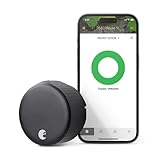
The August design concept is clever and it works: the lock replaces nothing on the outside of your door. Same keyhole, same exterior hardware, same look to your neighbors. The motor and electronics attach to the interior thumb turn, so your landlord (or HOA) has nothing to complain about. That’s the whole pitch, and for a lot of people it’s a persuasive one.
Connectivity is built into the lock itself – no bridge required, unlike the older August models. It connects directly to your 2.4GHz or 5GHz Wi-Fi. HomeKit works natively (read our full breakdown in do August smart locks work with HomeKit). Alexa and Google Assistant are both supported. DoorSense tells you whether the door is actually closed and latched, not just locked – a genuinely useful feature that saves you from remote-locking a door that’s sitting open.
The tradeoff: you’re limited to your existing deadbolt’s mechanical quality. If your deadbolt is a $20 Kwikset from 2003, the August doesn’t upgrade that. Battery life runs about 3 months. And it sticks out noticeably on the interior side – not a problem functionally, but it’s a chunky addition to an otherwise normal door.
No Matter support. If you’re building a Thread-based smart home or planning to consolidate everything under a Matter controller, the August Wi-Fi lock won’t be part of that picture. For most people right now that’s a non-issue. For people thinking two or three years out, it’s a real limitation.
Buy it if: You’re renting, you want to keep your existing deadbolt, or you just want the simplest possible smart lock installation. Check current price on Amazon.
Schlage Encode Plus
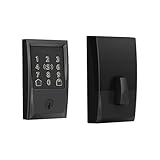
The Schlage Encode Plus is a complete deadbolt replacement – you remove your old deadbolt entirely and install this in its place. That’s more work upfront (about 30-45 minutes if you haven’t done it before), but the result is a cleaner installation with better mechanical quality than most retrofit locks can claim. Schlage’s ANSI Grade 1 rating is the highest residential deadbolt standard in the US. The physical lock is legitimately better than what most people are replacing.
The headline feature in 2026 is Apple Home Key: you tap your iPhone or Apple Watch to the lock face to unlock it, no app required. It’s quick, it works reliably, and it’s the kind of thing that makes a $329 lock feel worth it if you’re already deep in the Apple ecosystem. HomeKit support has been solid since launch. Read the full rundown of Schlage smart lock options in our Schlage smart lock guide.
Built-in Wi-Fi means no hub, no extra hardware, just the lock and your network. There’s also a built-in alarm that triggers on door impact – useful, though it can fire false positives if you live somewhere with a lot of door slams.
What it doesn’t have: Matter support. Schlage has been slow on this front. If you’re Google Home or Amazon Alexa-first, the Encode Plus still works via those integrations, but you’re relying on cloud bridges rather than a native Matter connection. Also no fingerprint reader. If biometrics matter to you, look at Ultraloq instead.
Buy it if: You own your home, you’re replacing an old deadbolt anyway, and you’re in the Apple ecosystem. Check current price on Amazon.
Yale Assure Lock 2
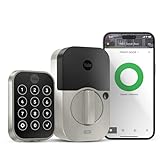
Yale’s Assure Lock 2 is the most flexible option in the lineup, which is both its strength and why it requires more homework before you buy. The lock is sold in different connectivity configurations: Wi-Fi only, Z-Wave, Zigbee, and – the one to pay attention to in 2026 – Matter over Thread. The base lock is the same in each case; the connectivity module is different.
Matter over Thread is worth understanding. Thread is a low-power mesh networking protocol designed specifically for smart home devices – it’s more reliable than Wi-Fi for a device that’s installed in a door and running on batteries, and it doesn’t clog up your 2.4GHz network. Matter is the application layer that runs on top, which means the Assure Lock 2 with Thread works natively with Apple Home, Google Home, Amazon Alexa, and Samsung SmartThings – all of them, without separate integrations or cloud bridges. That’s the future of smart home interoperability, and Yale is one of the few lock brands shipping it right now.
You’ll need a Thread border router for the Matter version to work – an Apple HomePod mini, Apple TV 4K, or similar device. If you already have one of those in your home, this is a non-issue. If you don’t, it’s an added purchase.
The touchscreen keypad is clean and responsive. Build quality is solid for the price point. HomeKit works well on the Wi-Fi and Matter versions. The Wi-Fi version connects directly like the August and Schlage – no hub needed for that variant specifically.
Buy it if: You want genuine Matter compatibility and are planning a multi-ecosystem smart home. Also a good pick if you want a touchscreen keypad without paying Schlage prices.
Ultraloq U-Bolt Pro Wi-Fi

The Ultraloq U-Bolt Pro is the pick if you want fingerprint access. It stores up to 100 fingerprints, plus a touchscreen keypad, app control, and physical key backup – more entry methods than anything else in this price range. The built-in Wi-Fi means no hub, and it connects to a 2.4GHz network like the August and Schlage.
Price-to-feature ratio is hard to argue with at around $150-$180. The fingerprint reader is fast enough to not be annoying, which is the real test. Battery life is better than average – up to a year with lithium batteries on the Wi-Fi model, which is meaningfully better than the 3-month recharge cycle on the August.
The caveats: the app is functional but not polished – expect occasional connectivity hiccups and an interface that feels more utilitarian than refined. HomeKit support is limited on the standard Wi-Fi version; the dedicated Matter over Thread variant handles Apple Home more cleanly but costs more and requires a Thread border router. The physical design is also distinctly chunky – functional, weatherproof (IP65), but not subtle.
Buy it if: Fingerprint access is a priority and you don’t want to pay for a Schlage-level deadbolt. Good secondary home option where a shared keypad code isn’t enough.
What to Look For When Buying a Smart Lock
Retrofit vs. Full Replacement
Retrofit locks (August, and the original Kwikset Kevo approach) attach to your existing interior thumb turn. They’re fast to install and reversible. Full replacement locks (Schlage, Yale, Ultraloq) remove your old deadbolt entirely. Full replacements give you better build quality and a cleaner look, but require more installation work and aren’t reversible without buying another deadbolt.
For renters: retrofit. For homeowners replacing aging hardware: full replacement.
Hub Required vs. No Hub
Every lock on this list has a no-hub option. August, Schlage Encode Plus, and the Yale Assure Lock 2 Wi-Fi version all connect directly to your Wi-Fi router. The Yale Matter over Thread version and the Ultraloq Matter variant do require a Thread border router – but those are increasingly common. Apple HomePod mini (2nd gen), Apple TV 4K (3rd gen), and some Eero routers are all Thread border routers already in a lot of homes.
If your smart home is already built around a hub like SmartThings or Home Assistant, the Z-Wave Yale variants give you local processing and excellent reliability. Z-Wave is more reliable than Wi-Fi for locks specifically – it uses 908.42MHz in the US, which doesn’t compete with your 2.4GHz devices and has a longer range through walls.
Matter vs. Z-Wave vs. Wi-Fi Direct
Matter is the new interoperability standard that Apple, Google, Amazon, and Samsung all agreed on. In theory, a Matter device works with all four ecosystems without separate cloud integrations. In practice, it’s mostly delivered on that promise for locks – a Matter smart lock added to Apple Home also shows up in Google Home automatically via multi-admin.
Wi-Fi direct (August, Schlage) is simpler to set up but means your lock is tied to one ecosystem’s cloud. If Amazon’s Alexa integration goes down, your remote access goes with it. Wi-Fi also consumes more battery than Thread or Z-Wave.
Z-Wave is still the choice for people running Home Assistant or SmartThings who want local processing and maximum reliability. It’s not going away, but it’s not gaining ground either.
Deadbolt Compatibility
Most smart locks require a standard single-cylinder deadbolt prep – a 2-1/8″ cross-bore (the main hole through the door) and a 1″ edge bore (the latch hole from the side). That covers the majority of US exterior doors. The exceptions are doors with non-standard prep, double-cylinder deadbolts (keyed on both sides), or very thin doors.
Check the door thickness spec for whatever lock you’re buying. Most US exterior doors are 1-3/4″ thick, which fits everything on this list. Euro-cylinder doors (common in European properties) are a different standard entirely and most of these locks won’t fit without an adapter.
How to Install a Smart Lock (Replacing a Standard Deadbolt)
