

This post contains affiliate links. If you buy through them, DumbSwitches may earn a commission at no extra cost to you. See our full disclosure.
Here is the honest answer nobody wants to hear: Ring discontinued the official Solar Charger for the Video Doorbell 2. It is gone from Ring’s store, gone from most retailers, and Ring’s support pages confirm it explicitly. If you have a Doorbell 2 and were counting on Ring’s first-party solar solution, you are out of luck – at least officially.

The reason is a connector mismatch. The Doorbell 2 charges via micro-USB. Ring’s current solar chargers (Solar Panel, Solar Charger 2nd Gen, and anything sold today) use a fork/barrel connector or USB-C – neither of which plugs into your Doorbell 2. So even if you bought a brand-new Ring solar panel today, it would not work. Different connector, full stop.
What you actually can do: use a third-party micro-USB solar panel. They will not replace wall-outlet charging in cloudy climates, but in a decent sun exposure they will top up the battery and meaningfully stretch the time between charges. Below is what to look for and what actually works.
Why Ring’s Current Solar Chargers Don’t Work on the Doorbell 2
Ring has been quietly redesigning its solar lineup for several years. The original Solar Charger for the Video Doorbell 2 – the one with the included micro-USB cable – was discontinued. Ring’s official support page for it now reads: “Solar Charger for Video Doorbell 2 and Solar Charger for Video Doorbell (1st Gen) are discontinued.”
Every Ring solar charger currently sold uses either a fork-style connector (for newer battery doorbells like the Video Doorbell 3, 4, Battery Doorbell Plus) or a USB-C connector (for the Battery Doorbell 2nd Gen and camera lineup). The Doorbell 2 has neither of those ports. It has micro-USB. Ring makes no adapter for this, and none of the current lineup bridges the gap.
The practical upshot: if you want a Ring-branded solar solution, you need a newer doorbell. If you want to keep the Doorbell 2 and still get some solar charging, you need a third-party panel with a micro-USB output.
Third-Party Micro-USB Solar Panels That Work
Several third-party manufacturers make solar panels specifically for Ring doorbells with micro-USB ports. These are not official Ring accessories, but they do the job. The key specs to match: 5V output, at least 2W (2.5W-3W is better), weatherproofed (IP65 minimum), and a micro-USB cable – not a fork connector, not USB-C.
Wasserstein Weatherproof Solar Panel for Ring Video Doorbell 2
Wasserstein makes a solar panel designed specifically for the Ring Video Doorbell 2 (the original, not the 2020 2nd Gen). It uses a micro-USB cable, mounts near the doorbell, and connects directly to the charging port. This is the closest like-for-like replacement for the discontinued Ring original.
One important note: do not confuse this with the Wasserstein solar charger for Ring 3/4/Battery Doorbell Plus – that model uses a different connector. Make sure the listing says “Ring Video Doorbell 2” (not “2nd Gen,” which is the 2020 model).
What to Expect From Solar Charging on the Doorbell 2
Solar topping up the Doorbell 2 is not the same as running it indefinitely off solar. The doorbell’s power draw – especially motion events, live view, and night vision – exceeds what a small solar panel can generate in marginal sun conditions. Think of it as extending intervals between charges, not eliminating them.
In practice: strong daily sun (4+ hours direct) in a south-facing position will noticeably reduce charge cycles. Shaded or north-facing walls may see minimal benefit. The Ring app shows a “Solar Status” indicator when connected – check it after a few sunny days to confirm the panel is actually contributing.
How to Install a Third-Party Solar Panel on the Ring Doorbell 2
Choose the mounting location
Pick a spot on the wall near the doorbell that gets direct sun for at least 4 hours a day. South-facing walls work best in the Northern Hemisphere. Avoid spots shaded by overhangs, trees, or neighboring structures – even partial shade kills solar output.
Mount the solar panel bracket
Most third-party panels include a wall bracket and screws. Mark your holes, drill into the wall surface (check for wiring first), and secure the bracket. The panel should angle toward the sun – 30-45 degrees from horizontal is the sweet spot for most latitudes.
Connect the micro-USB cable to the doorbell
Run the panel’s micro-USB cable to the charging port on the back of the Ring Doorbell 2. The port is under the faceplate – you will need to remove the doorbell from its mount bracket to access it, then re-seat the doorbell with the cable routed through the bracket.
Verify Solar Status in the Ring app
Open the Ring app, go to Device Health for your doorbell, and check the Solar Status field. It should show ‘Connected’ once the panel is receiving sunlight. If it shows ‘Not Connected,’ re-check the micro-USB connection at both ends.
Keep the panel clean
Dust, bird droppings, and debris reduce output. Wipe the panel surface with a dry cloth or soft brush every few months. Do not use water directly on the panel or any cleaning chemicals.
Troubleshooting Solar Status Not Connected
If the Ring app shows “Solar Status: Not Connected” after installation, run through these checks before assuming the panel is defective.
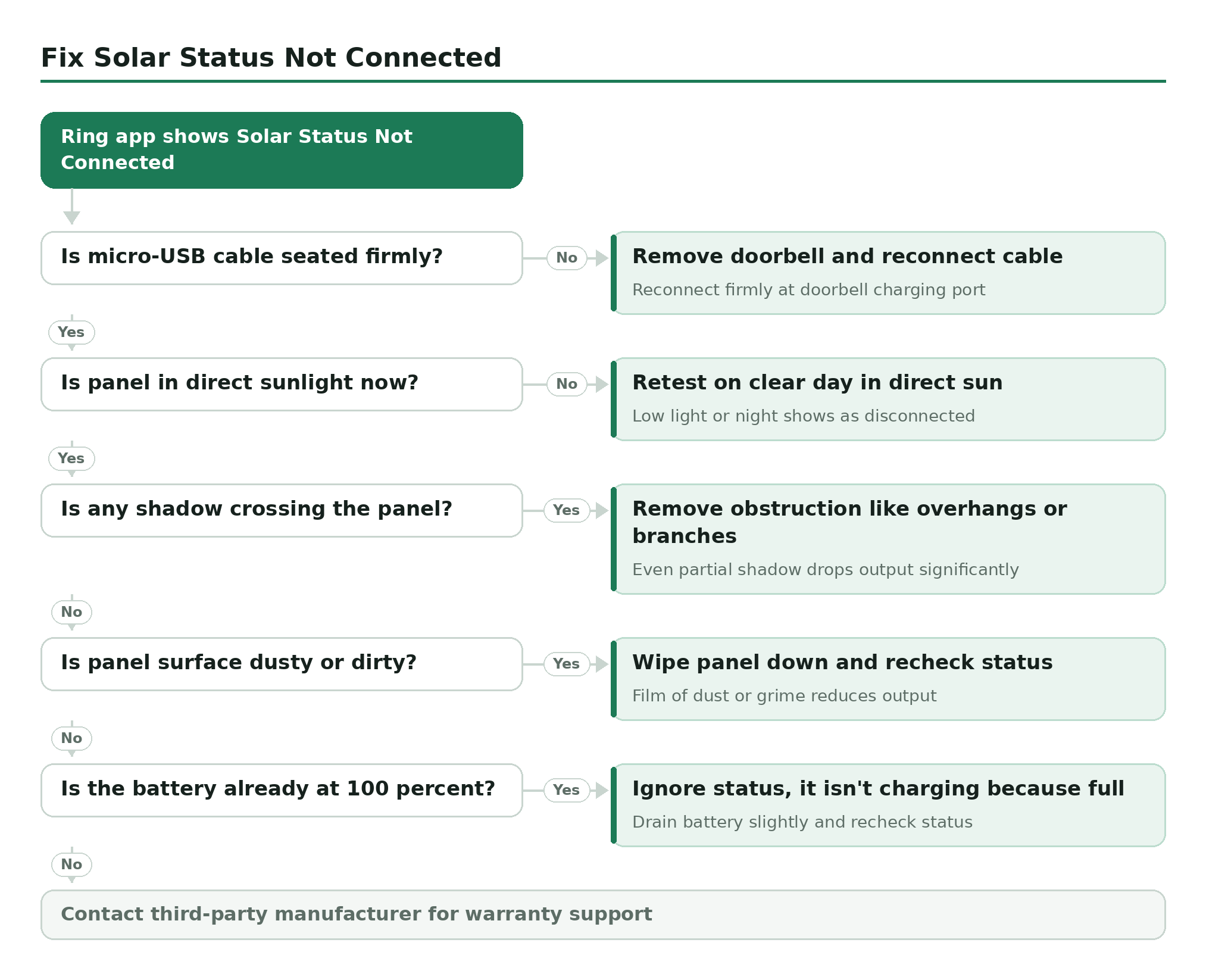
- Check the micro-USB connection: The cable needs to be seated firmly at the doorbell’s charging port. Remove the doorbell from its mount and reconnect the cable.
- Check sunlight exposure: The Solar Status indicator only updates when the panel is actually receiving light. Test it on a clear day with the panel in direct sun – the reading in low light or at night will show as disconnected.
- Check for obstructions: A shadow across even part of the panel drops output significantly. Overhangs, gutters, and tree branches are common culprits.
- Check the panel is clean: A film of dust or grime on the surface reduces output. Wipe it down and recheck.
- Check the battery isn’t already full: If the battery is at 100%, the Solar Status may show as not charging (because it isn’t – it doesn’t need to be). Drain the battery slightly and recheck.
If none of that fixes it, the panel itself may be faulty. Contact the third-party manufacturer for warranty support – Ring support will not cover third-party accessories.
Should You Upgrade Instead?
The Ring Video Doorbell 2 is discontinued hardware. Ring no longer makes accessories for it, and third-party support will thin out over time. If you are spending money on a solar panel for a 2016-era doorbell, it is worth asking whether an upgrade makes more sense.
The Ring Battery Doorbell Plus is the current mid-range option – it has a taller field of view (head-to-toe), better video quality, and works with Ring’s current solar lineup. The Solar Charger for Battery Doorbells connects via a fork connector and plugs straight into the Battery Doorbell Plus’s dedicated solar port. No adapters, no third-party workarounds, no discontinued accessories.
If solar-powered operation is a priority and you are on older hardware, upgrading to a current Ring model is the cleaner path. The Doorbell 2 solar situation is a dead end – workable with third-party panels, but not a long-term solution.