
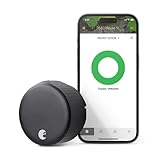
Yes, August smart locks work with Apple HomeKit. The short version: the August Wi-Fi Smart Lock (4th Gen) is the one to buy – built-in Wi-Fi, full HomeKit support, no extra hub required from August’s side. The older Smart Lock Pro works too but needs the separate August Connect bridge for remote access outside the home.
This guide covers which models are compatible, exactly what hardware you need, how to set it up, and what HomeKit can actually do with an August lock once it’s in.
Which August Locks Support HomeKit
Two current models support HomeKit:
- August Wi-Fi Smart Lock (4th Gen) – the main one. Has Wi-Fi built in, supports HomeKit, Alexa, Google Assistant, and SmartThings out of the box. ASIN: B082VXRND2. Installs over your existing deadbolt in about 10 minutes.
- August Smart Lock Pro (3rd Gen) – older model, still sold, still HomeKit-compatible. Uses Z-Wave Plus in addition to Bluetooth and HomeKit. Requires the August Connect Wi-Fi Bridge ($79) if you want remote access through the August app. HomeKit remote access is separate from that – see below.
August also has older 2nd-gen HomeKit-enabled models floating around on Amazon. They still work, but the 4th Gen Wi-Fi lock is the current product and the one worth buying new.
One ownership note: August is now owned by Fortune Brands Innovations (they acquired it from Assa Abloy in 2024). The August app and HomeKit integration continue to work as before.
Hub Required? Here Is What You Actually Need
This trips people up, so let’s be precise.
August Wi-Fi Smart Lock (4th Gen): No August hub or bridge required. The Wi-Fi radio is built into the lock itself. You pair it directly to HomeKit using the HomeKit setup code that ships in the box. For remote access through HomeKit (controlling the lock when you’re away from home), you need an Apple home hub – a HomePod, HomePod mini, or Apple TV. That’s a standard HomeKit requirement, not specific to August.
August Smart Lock Pro (3rd Gen): The lock communicates via Bluetooth. HomeKit itself only needs a nearby Apple home hub for remote access – same as above. However, if you want remote access through the August app (rather than the Home app), you need the August Connect Wi-Fi Bridge separately. They’re different channels. HomeKit doesn’t route through the Connect bridge.
For most people buying today: get the 4th Gen Wi-Fi lock. Cleaner setup, no extra hardware.
How to Set Up August With HomeKit
Install the lock on your deadbolt
Remove your existing interior thumbturn. Mount the August adapter plate, slide the lock on, and secure it. Takes about 10 minutes with a screwdriver. The exterior keyhole stays intact.
Download the August app and create an account
The August app is required for initial setup even if you plan to use HomeKit for daily control. Create an account, then add a new device and follow the pairing steps via Bluetooth.
Connect the lock to your Wi-Fi network
On the 4th Gen Wi-Fi lock, the app will prompt you to connect to your home Wi-Fi. This enables remote access and cloud features within the August app.
Add to HomeKit using the setup code
In the August app, go to your lock settings and tap Enable HomeKit. Alternatively, open the Apple Home app, tap the + button, select Add Accessory, and scan the HomeKit setup code printed on the card that came with the lock. The code is also on a sticker inside the lock housing.
Assign the lock to a room in the Home app
HomeKit will prompt you to assign the lock to a room. Pick the room that matches the door location (e.g., Front Door, Entryway). This affects how scenes and automations reference the lock.
Test lock and unlock from the Home app
Open the Home app and tap the lock tile to verify it responds. Then test from outside your home network to confirm remote access is working via your Apple home hub.
What You Can Do With August in HomeKit
Once it’s in, the lock behaves like any other HomeKit accessory. Practically, that means:
- Siri control – “Hey Siri, lock the front door” works reliably when the lock is online and your home hub is nearby.
- Automations – Lock automatically at a set time (useful if you consistently forget), or lock when everyone leaves home using HomeKit’s presence detection.
- Scenes – Include the lock in a Goodnight scene that also turns off lights and sets the thermostat. One tap before bed.
- Remote access – Lock or check status from anywhere via the Home app, as long as you have a HomePod or Apple TV acting as a home hub.
- Home app widget – Add a lock/unlock tile to your iPhone home screen for one-tap access without opening the app.
One thing to know before you buy: August locks have a documented “No Response” bug in HomeKit where the lock randomly goes unresponsive in the Home app even though it works fine in the August app. It’s a Bluetooth proximity issue – the HomeKit path runs through your Apple home hub via Bluetooth, not directly over Wi-Fi. Keeping your HomePod or Apple TV within reasonable range of the lock helps. If it does happen, the fix is usually removing and re-pairing the accessory in HomeKit. Annoying, but not a dealbreaker.